Dorm Room Study Setup — Complete Guide
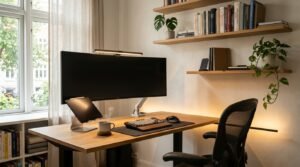
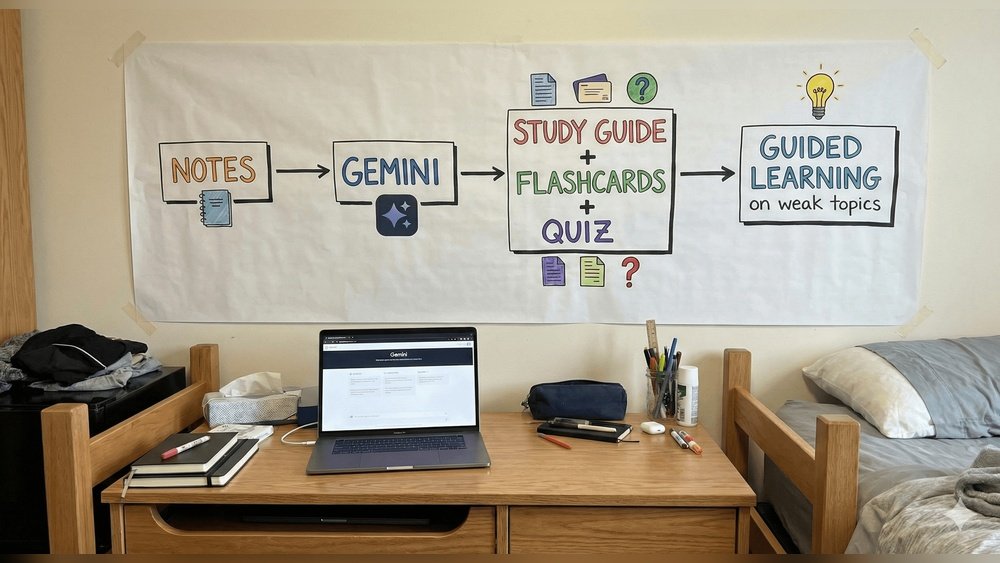
Did you know that students with a dedicated study space score, on average, 17% higher on exams? Your dorm room study setup isn’t just about where you put your laptop—it’s about building a space for focus, comfort, and results. Many college students struggle to balance limited space, tight budgets, and the need for a motivating atmosphere. But with the right setup, even a small dorm can turn into your productivity zone.
A good study space helps you keep your mind clear and your goals in sight. When your room is set up the right way, you waste less time searching for supplies or fixing problems like bad lighting or tangled cords.
You can start working quickly and stay focused longer. This is especially important when you have a lot of assignments and not much time. A well-planned setup supports your study habits and can even make you look forward to sitting down and getting things done.
What Makes A Great Dorm Study Setup?
A productive study space is more than a desk and chair. It’s a combination of organization, proper lighting, comfort, and tools that match your style. Think of your study area as your home stadium—a place where you’re ready to play your best game every time. The right setup reduces distractions, improves motivation, and even helps you remember what you study.
A great dorm study setup also makes it easier to separate work time from relaxation. When your brain connects a specific spot with focus, it’s easier to get in the right mindset. Over time, you’ll notice you get more done in less time.
You may even find you need to study less because you remember more. It’s not just about having the right things; it’s about making your space work for you.
Essential Vs. Optional Items
Focusing on essentials first saves money and keeps your space tidy. Optional items add comfort and personality but aren’t strictly necessary.
Quick Stat: A 2023 survey found that 68% of high-performing students use at least three dedicated study tools in their dorm setup.
| Item | Essential | Optional |
|---|---|---|
| Desk & Chair | ✔️ | |
| Lamp | ✔️ | |
| Laptop/PC | ✔️ | |
| Monitor | ✔️ | |
| Organizer/Storage | ✔️ | |
| Noise-canceling headphones | ✔️ | |
| Plants/Decor | ✔️ |
Having both essential and optional items gives you flexibility. For example, you might skip a monitor if your desk is small, but add headphones if your dorm is noisy. The most important thing is to start with basics, then build your setup as you discover what helps you most.
Step-by-step: Build The Ultimate Dorm Study Setup
1. Choose The Right Location
Find a spot in your dorm with the least distractions. Near a window gives natural light but avoid high-traffic areas. If you share a room, use a corner or put up a small divider.
Pro tip: If your dorm desk faces a wall, add a small poster or photo to break up the blank space and boost your mood.
If your only option is a shared space, try to study at times when your roommate is out or busy. Some students use folding screens or even a row of stacked books to signal “study time. ” The key is finding a spot you can return to again and again—this helps build a routine.
2. Invest In A Comfortable Desk And Chair
A wobbly chair or tiny desk leads to bad posture and less study time. Look for a chair with back support and a desk with enough space for your laptop and notebooks. If you can’t buy new, check campus “move-out” sales or ask your college for loaner furniture.
Common mistake: Choosing style over comfort. Focus on support and size first.
An adjustable chair is ideal, but even a simple cushion or rolled towel for your lower back can make a huge difference. If your desk is too high or low, stack books under your monitor or use a footrest to improve ergonomics.
Small tweaks here can help you avoid back pain and make long study sessions more bearable.
3. Optimize Lighting
Bad lighting strains your eyes and makes you tired. Use a desk lamp with adjustable brightness. Position the lamp to reduce shadows. If you study at night, choose a warm light to avoid blue light effects.
Tip: Clip-on lamps save space and let you direct light exactly where you need it.
If possible, try layering your lights: combine your main room light, a desk lamp, and some natural light. This reduces eye strain. Don’t forget to clean lamp covers—they get dusty and dim over time. If you wear glasses, adjust the lamp to avoid glare on your lenses.
4. Keep Cords And Chargers Organized
A tangle of cords is distracting and unsafe. Use cable ties or a simple box to keep chargers, USB cables, and adapters tidy. Label each cord if you have more than two.
You can find reusable Velcro ties or even use bread clips for quick fixes. Try not to run cords across walking areas—they’re a tripping hazard and will get stepped on or pulled out accidentally.
5. Add Storage And Organization Tools
Stackable bins or under-desk drawers keep your desk clear. Use vertical space—hooks, shelves, or file holders on the wall. This keeps important items close and clutter away.
Example: A small caddy for pens, sticky notes, and highlighters saves time hunting for supplies.
Don’t forget over-the-door organizers for extra storage. Magazine holders can store folders, and small trays can hold flash drives and chargers. The less you have on your desktop, the easier it is to focus.
6. Use A Large Mousepad Or Desk Mat
A desk mat protects your desk and creates a defined study zone. It also stops your mouse and laptop from sliding.
Desk mats come in different materials—some are soft, others are easy to wipe clean. Choose one big enough for your keyboard and notebook. It’s a small touch but makes your space feel more “finished. ”
7. Create A Charging Station
Dedicate one power strip or charging block for all your devices—phone, laptop, tablet. This prevents last-minute panic when your device is low on battery.
Non-obvious insight: Keep a backup charger or power bank in your drawer for emergencies.
If your outlets are far from your desk, an extension cord or multi-port USB charger can be a lifesaver. Try to charge devices overnight so you’re always ready for class or a long study session.
8. Personalize With Motivation
A few photos, a vision board, or inspirational quotes make your space inviting. But don’t overdo it—too many decorations become a distraction.
Pick things that truly motivate you, like a photo of your family, a goal list, or a favorite quote. Change these out each semester to keep your space fresh and inspiring.
9. Add A Whiteboard Or Corkboard
A whiteboard is perfect for to-do lists, reminders, or quick notes. A corkboard can hold important dates, class schedules, or mail.
Practical example: Use colored markers to separate tasks by priority.
You can also use sticky notes for flexible reminders. If wall space is limited, try a small desktop whiteboard or a magnetic board that attaches to your lamp or shelf.
10. Manage Noise
If your dorm is noisy, use noise-canceling headphones or a white noise app. For a cheaper option, foam earplugs work well.
Experiment with different sounds—some people focus better with instrumental music, others with nature sounds. If possible, agree with your roommate on “quiet hours” for study.
11. Keep Supplies Stocked
Always have extra pens, paper, and sticky notes in your organizer. Running out mid-study kills momentum.
Warning: Don’t overload your desk with supplies you never use. It creates clutter and stress.
Rotate your supplies each month. If you notice you never use a certain pen or type of sticky note, store it away or give it to a friend.
12. Control Temperature And Airflow
A small fan or air purifier can make your study area more comfortable. Stuffy rooms lower focus and energy.
If you can open a window for a few minutes each day, do it. Fresh air helps you stay awake and prevents headaches. In winter, a small blanket or heated pad can help, but make sure it doesn’t distract you.
13. Add A Plant Or Two
A real or fake plant adds life and helps reduce stress. Even a tiny succulent can make your desk more inviting.
Plants like pothos or snake plant are easy to care for and survive in low light. If you’re worried about spills, choose a fake plant for the same visual effect.
14. Plan For Snacks And Drinks
Keep a reusable water bottle and a few healthy snacks nearby. Avoid sugary drinks, which lead to energy crashes.
Good snack options include mixed nuts, granola bars, or dried fruit. Set a rule: snacks only during breaks, not while typing or reading. This keeps your desk clean and helps you focus.
15. Set Up Digital Organization
Use online tools like Google Calendar or Notion to track assignments and deadlines. Sync across devices for easy access.
Pro tip: Set a daily reminder to clean your desk and organize files.
Try color-coding your classes or setting up digital folders for each subject. Backup your files regularly—nothing is more stressful than losing notes before finals.
Budget And Time Breakdown
You don’t need to spend a fortune. Here’s how most students split their budget and time.
| Item/Task | Average Cost (USD) | Setup Time |
|---|---|---|
| Desk & Chair | $50–$120 (used/new) | 1 hour |
| Lamp | $15–$30 | 10 minutes |
| Organizer/Storage | $10–$25 | 20 minutes |
| Whiteboard/Corkboard | $8–$20 | 10 minutes |
| Plants/Decor | $5–$15 | 5 minutes |
| Noise Solutions | $1–$40 | 0–2 minutes |
Total estimated cost: $100–$250 (depending on choices)
Total setup time: 2–3 hours
Remember, you can save money by buying used items, sharing with roommates, or getting creative with DIY solutions. Sometimes swapping an item with a friend or using what you already have works just as well.
Common Mistakes And How To Avoid Them
Many students make the same errors when setting up their dorm study space. Avoid these for a smoother experience:
- Overcrowding: Filling your desk with gadgets and supplies you never use.
- Ignoring comfort: A hard chair or poor lighting causes fatigue.
- Forgetting power access: Placing your desk too far from outlets.
- Neglecting airflow: Stuffy air leads to headaches and low energy.
- Not personalizing: A sterile space lowers motivation.
Tip: Review your setup every month. Remove unused items and update as your needs change.
Another common mistake is not adjusting your setup as the semester changes. For example, you may need more space for books during finals or quieter options if your roommate’s schedule shifts. Be flexible and willing to tweak your setup for the best results.

Quick-start Checklist
- Desk and supportive chair
- Adjustable lamp
- Laptop or tablet
- Organizer/bin for supplies
- Power strip near desk
- Whiteboard or corkboard
- Headphones or earplugs
- Water bottle and snacks
- Plant or small decor
- Backup charger
This checklist works as a starting point. As you settle in, add or remove items to match your style and needs.
Do’s And Don’ts
| Do | Don’t |
|---|---|
| Choose comfort over style | Clutter your desk |
| Use vertical space | Ignore lighting |
| Keep cords organized | Place desk near distractions |
You’ll find that following these simple do’s and don’ts will help you avoid the biggest frustrations most students face.
Resource Summary
- Your school’s housing office (for furniture options)
- Campus “free and for sale” groups (cheap finds)
- Study tool apps (Notion, Google Calendar)
- For more ideas, see Wirecutter’s Dorm Room Essentials
Check your student handbook or ask upperclassmen for more tips on what’s allowed in your dorm.
Key Takeaways
- Comfort and organization are more important than having the latest gadgets.
- start With Essentials And Add Personal Touches Over Time.
- maintain Your Space Monthly To Keep It Effective And Stress-free.
- Small changes, like better lighting or a simple plant, can boost focus.
- Use digital tools to stay on track with assignments and deadlines.
The best study spaces grow with you. Don’t be afraid to experiment and find what works best for your habits and schedule.
Frequently Asked Questions
How Do I Maximize A Small Dorm Room For Studying?
Use a corner desk, vertical shelves, and storage bins under your bed. Keep only the essentials on your desk and use wall space for organizers.
If your room is very tight, consider portable fold-up desks or lap desks you can stow away. Try to share certain supplies with your roommate to save space.
What Is The Best Lighting For A Dorm Study Space?
A desk lamp with adjustable brightness is ideal. Warm light is better for evening study, while natural daylight is best during the day.
If you get headaches or eye strain, try switching the bulb type or adjusting lamp position until you find a comfortable setup.
How Can I Reduce Distractions In My Dorm?
Face your desk away from the door, use headphones or earplugs, and keep your phone out of reach during study sessions.
You can also set a timer for focused work sessions and take breaks outside your study area to rest your mind.
Are Plants Really Helpful For Study Focus?
Yes. Even a small plant can reduce stress and make your space more inviting, which helps you focus and feel calm.
Choose low-maintenance plants if you’re worried about care. Even fake greenery can boost your mood.
What Should I Do If My Roommate Is Noisy?
Talk to your roommate and set quiet times. Use noise-canceling headphones or a white noise app during study hours.
If problems continue, check with your RA (resident advisor) for help finding solutions, like study rooms or quiet hours.
A well-designed dorm study setup doesn’t need to be expensive or complicated. With smart choices and regular updates, your dorm can become your favorite place to learn and succeed.
According to sleep posture research published by the Sleep Foundation, proper surface cushioning and pressure-point relief are essential for spinal alignment during demanding academic semesters.
To make the most of your study sessions, continue reading our companion piece on Best Ergonomic Chair for Students Budget: Top Picks 2024 and our deep dive into Top Aesthetic Desk Accessories for College Students in 2024.
Our Editorial Standards & Review Methodology
Every guide, study method, and student product review on Eduventurely is independently researched, curated, and evaluated for academic utility, build quality, and real-world value. We never accept paid placements, sponsored reviews, or biased manufacturer rankings. When you choose to purchase through our links, we may earn an affiliate commission at zero additional cost to you. Read our full editorial & testing policy →