Udemy Vs Coursera — Which Is Better For Students?
How do you pick the right online learning platform when over 180 million people use online courses globally each year? For students, choosing between Udemy and Coursera can shape skills, job prospects, and even future earnings. Both platforms offer thousands of courses, but they are designed for different learning goals. Let’s see how Udemy and Coursera truly compare—and which one is better for students who want the best value, results, and flexibility.
How Udemy And Coursera Work
Before comparing, it’s important to know the basic differences.
Udemy is a marketplace where anyone can create and sell a course. You’ll find over 200,000 courses on almost every topic, from Python to cooking. Most courses are video-based with lifetime access after purchase. This means you can revisit materials anytime, even years after you first enroll, which is useful for reviewing or updating your skills.
Coursera partners with universities and companies like Stanford, Google, and Yale. It offers over 9,000 courses, many with official certificates, degrees, or professional credentials. These courses usually follow academic standards, so the content is carefully designed and reviewed by experts. Because of this partnership model, Coursera also offers some programs that can count toward real university credit.
Key Platform Differences
| Udemy | Coursera | |
|---|---|---|
| Course Creators | Anyone (experts & enthusiasts) | Universities & companies |
| Course Count | 200,000+ | 9,000+ |
| Certificates | Completion (non-accredited) | Accredited, professional certificates, degrees |
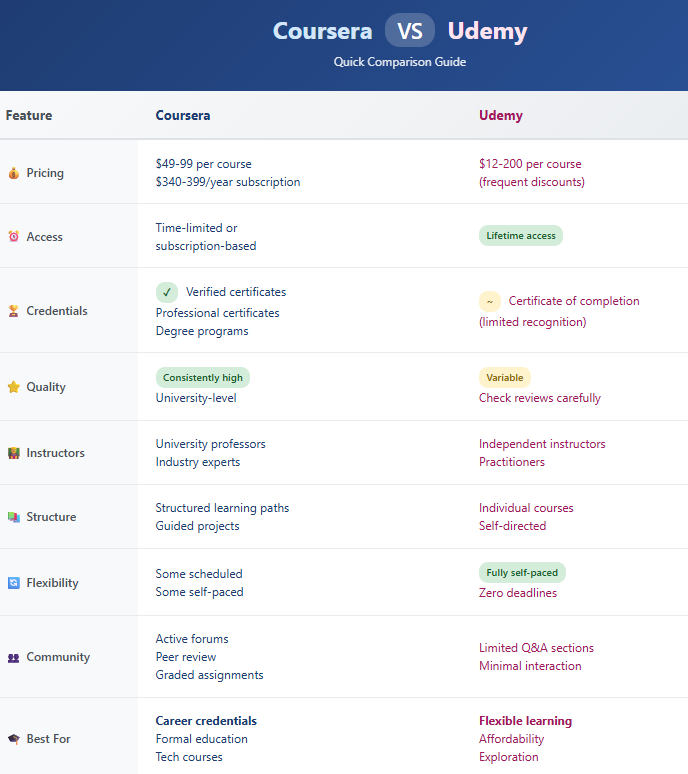
| Access Model | Buy once, keep forever | Monthly/annual subscription, or pay per course |
| Languages | Over 65 | Over 40 |
One non-obvious difference is that with Coursera, some courses are part of larger learning paths or “Specializations. ” On Udemy, each course stands alone, so you need to find follow-up courses yourself if you want to go deeper.
Course Quality And Structure
Udemy
Courses on Udemy vary because anyone can teach. Some are world-class, others are basic. Reviews and ratings help, but quality is not always consistent. Most courses include:
- Short video lessons (average course: 5–7 hours)
- Downloadable resources such as PDFs, code, or templates
- Lifetime access (watch anytime, retake lessons as needed)
You’ll also find quizzes or practice exercises in some courses, but this depends on the instructor. Some instructors are industry experts, while others may be self-taught enthusiasts. Because of this, always look at the instructor’s background and sample lessons. One extra tip: Check the course’s “last updated” date. Tech skills change quickly, so you want a course that’s still relevant.
Coursera
Coursera’s courses come from universities and big companies. They are often part of a series (specialization), and include:
- Structured weekly lessons (4–12 weeks), often with a recommended timeline
- Assignments and quizzes to test your understanding
- Peer-graded projects, where you learn by giving and receiving feedback
- Official certificates (sometimes for a fee, but more valuable)
Some Coursera courses have video subtitles in multiple languages and offer discussion forums for students. Instructors and teaching assistants sometimes answer questions directly. Because Coursera uses a university-style approach, you might need to submit homework or complete group projects for some classes.
Example: A Coursera Google IT Support course includes video, readings, graded quizzes, and a certificate from Google. Students often work through real-world scenarios, not just theory.
Tip: On Udemy, always check the number of ratings and preview videos. On Coursera, look for university or company partners for credibility. For both, read recent reviews—older courses may be out of date.
Affordability And Pricing
Udemy
- One-time purchase: Most courses cost $13–$30 during sales.
- Lifetime access: No extra fees.
- Frequent discounts: Sales every month.
- No subscription needed.
You can buy just one course or several, and there’s no time limit to finish. Udemy also offers a 30-day money-back guarantee, so you can request a refund if you’re not satisfied.
Coursera
- Free audit: Many courses can be watched for free (no certificate).
- Certificates: Usually $49–$99 per course.
- Specializations: $39–$79/month subscription for groups of courses.
- Degrees: $9,000–$25,000 for full online degrees.
Coursera sometimes offers financial aid for students who cannot afford the fees. This can be helpful if you need a certificate but have a tight budget. Be aware that some Coursera content is only available with a paid subscription, especially for professional or degree-level courses.
| Platform | Lowest Cost per Course | Certificate Included? | Subscription Option? |
|---|---|---|---|
| Udemy | $13 | No (unless included by instructor) | No |
| Coursera | $0 (audit only), $49 (certificate) | Yes (if paid) | Yes (for Specializations, Plus) |
Pro Tip: For quick skills, Udemy is usually cheaper. For recognized certificates or academic use, Coursera has more value. Don’t forget to compare total costs if you plan to take several courses—Coursera’s subscription can add up over time.
Learning Experience
Ease Of Use
- Udemy: Simple dashboard, start any course anytime. You can download lessons for offline viewing in the mobile app, which is helpful for students without steady internet.
- Coursera: Set start dates, deadlines, and sometimes group projects. The platform guides you step-by-step through the content, so you know what to do next.
Flexibility
- Udemy: 100% self-paced. Start, pause, or repeat as often as you want.
- Coursera: Some courses are scheduled, some self-paced. For degree programs or certain specializations, you must follow a fixed timeline and submit assignments before deadlines.
Community And Support
- Udemy: Q&A with instructors (varies by course). Some instructors are very active, while others may not respond to questions.
- Coursera: Forums, peer reviews, sometimes mentor support. Coursera’s forums can be very active, especially in popular courses, so you can get answers from other students and teaching assistants.
Non-obvious insight: Udemy’s lack of deadlines is perfect for busy students or those with changing schedules. Coursera’s structure helps if you need motivation or like learning with others. Also, Coursera’s peer-graded assignments can help you learn from different perspectives.
Credit: hovernotes.io
Certificate Value And Career Impact
Udemy
- Certificates of completion only show you finished the course.
- Not recognized by most employers or universities.
- Good for showing effort on LinkedIn or resumes, especially for personal skills.
A Udemy certificate can help you show initiative, but it rarely counts for formal job applications. It’s useful for small business owners, freelancers, or people learning for personal growth.
Coursera
- Accredited certificates from top universities or companies.
- Recognized in job markets, especially for tech, data, and business.
- Some courses count as college credit, which can save you time and money if you later pursue a degree.
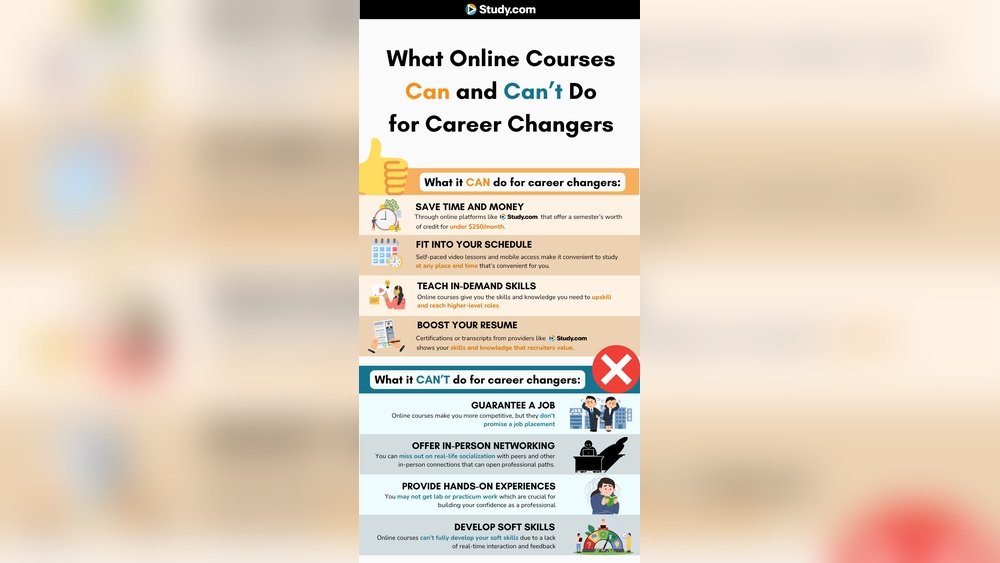
Fact: 87% of Coursera learners report career benefits (promotion, new job, or skill) after completing a certificate. This is especially true in fields like data science, IT, and business management, where employers look for recognized credentials.
One extra note: Some Coursera professional certificates are created with industry partners (like Google or IBM). These certificates are specifically designed to get you job-ready, often including hands-on projects and portfolio work.
Subjects And Languages
Course Variety
- Udemy: Wide range—coding, business, arts, hobbies, fitness, even personal topics like parenting or mental health.
- Coursera: Focus on academic, professional, and tech topics, such as programming, data science, business, and healthcare.
Languages
- Udemy: Courses in over 65 languages. Some courses include subtitles in multiple languages, which is helpful for non-native speakers.
- Coursera: Courses in over 40 languages, with subtitles and transcripts for most videos.
Tip: If you need language options or want to learn something non-academic, Udemy offers more variety. Coursera’s language coverage is best for its popular courses, but subtitles make it accessible for many learners.
Credit: ilampadmanabhan.medium.com
Real-world Use Cases
When Udemy Is Better
- You want a quick, affordable skill (e.g., Excel, Photoshop, yoga).
- You learn best at your own pace and need lifetime access for review.
- You want non-academic topics like photography, music, crafts, or personal development.
When Coursera Is Better
- You want a recognized certificate for your resume or LinkedIn.
- You’re aiming for a career change (e.g., data science, IT, business analysis).
- You want university-quality teaching and assignments, often with feedback from peers or professionals.
Example: Udemy is great for learning guitar basics over a weekend, or picking up a new hobby without spending much. Coursera is ideal for getting a Google IT Support certificate to apply for entry-level tech jobs, or for building a professional portfolio.
Pros And Cons
Let’s compare the main pros and cons side by side.
| Platform | Pros | Cons |
|---|---|---|
| Udemy |
|
|
| Coursera |
|
|
One extra insight: Udemy’s refund policy is generous, but Coursera’s refund window is shorter and only applies to some courses.
Decision Factors For Students
Ask Yourself
- Do you want a certificate for your career?
- Is your goal personal growth or professional advancement?
- Do you need lifetime access or a short-term credential?
- Are you comfortable with self-motivation or need deadlines?
- What’s your budget?
- Do you prefer learning alone or with a community?
- Will you need ongoing support or updates in your field?
Who Should Choose Udemy?
- Students on a tight budget.
- Learners who want to explore hobbies or personal interests.
- People who need flexible, anytime access.
- Those looking for quick, practical how-to guides.
Who Should Choose Coursera?
- Students needing official certificates for jobs.
- Those planning to transfer credit or pursue a full degree.
- Learners who want structured, academic-style courses.
- Anyone who values peer interaction or instructor feedback.
Important: If you want a certificate that employers value, Coursera is the safer bet. For learning new hobbies, skills, or side interests, Udemy shines. It’s also common to start with Udemy for basics, then move to Coursera for advanced or career-focused study.
Common Mistakes Students Make
- Ignoring course previews: Always watch sample lessons before buying—this helps you check the teaching style and content quality.
- Assuming all certificates are equal: Udemy’s are not accredited, so don’t expect them to count for official applications.
- Overpaying on Udemy: Wait for sales—never buy at full price, as discounts are frequent.
- Underestimating course commitment on Coursera: Some need 5–10 hours per week, so check the time requirements before enrolling.
- Not checking reviews: Look for recent, detailed student feedback to avoid outdated or low-quality courses.
- Not using platform features: Both sites offer mobile apps, offline downloads, and discussion forums—take advantage of these for a better experience.
Myth Vs Fact
| Myth | Fact |
|---|---|
| Udemy certificates are the same as university certificates. | Only Coursera’s are accredited and recognized by employers. |
| Coursera is always more expensive. | Many Coursera courses can be audited for free (no certificate). |
| All Coursera courses have strict deadlines. | Many are self-paced; check before enrolling. |
Another myth: “You need perfect English for Coursera.” In fact, many Coursera courses have subtitles, and some even offer full translation, making them accessible for non-native speakers.
Expert Verdict: Udemy Or Coursera?
If you are a student who wants practical, affordable, and flexible learning, Udemy is an excellent choice. For those who need career-boosting certificates, university-level teaching, or academic credit, Coursera wins.
Many students use both platforms: Udemy for hobbies and fast skills, Coursera for serious credentials. Combining both can give you a wide skill set, from soft skills to professional qualifications.
Remember, the “best” depends on your goals. Still unsure? Start with a free Coursera audit and a discounted Udemy course—you’ll quickly see which style fits you.
For more data on online course trends and student outcomes, see this Wikipedia resource.

Credit: keenethics.com
Frequently Asked Questions
What Are The Main Differences Between Udemy And Coursera?
Udemy is a course marketplace with open enrollment, while Coursera partners with universities for accredited content. Udemy is usually cheaper and more flexible; Coursera offers recognized certificates.
Are Udemy Certificates Useful For Jobs?
Udemy certificates show you completed a course but are not accredited. They are less valuable to employers compared to Coursera’s certificates.
Can I Access Coursera Courses For Free?
Yes, many Coursera courses are free to audit. However, you must pay if you want a certificate or graded assignments.
Which Platform Is Better For Tech Skills?
Coursera is better for professional and accredited tech skills. Udemy is good for fast, affordable learning in programming or IT basics.
Is It Possible To Get A Degree On Udemy Or Coursera?
You can earn full online degrees on Coursera (bachelor’s, master’s). Udemy does not offer degrees—just individual courses.
—
Key Takeaway: Choose Udemy for flexible, affordable learning and Coursera for career advancement and official certificates. Evaluate your goals, budget, and timeline before deciding. Both platforms can help you build real-world skills—if you choose wisely.