A study by McGraw Hill found that 81% of students believe digital learning tools help boost their grades. Today, technology is not just a distraction—it can actually transform how you study, improve your habits, and help you reach your academic goals faster. But with so many apps, devices, and online resources, it’s easy to feel lost. The good news? You can make technology your study partner, not your enemy. This guide will show you practical ways to use technology to build better study habits, get more done, and enjoy learning again.
Why Technology Matters In Study Habits
Technology is everywhere in education now. From online textbooks to note-taking apps, it’s changing the way students learn all over the world. But to really improve your study habits, you need to use technology the right way. The key is to make tech work for you—not against you.
Think about it: Digital tools can help you stay organized, remember more, and even make studying fun. But too much screen time or the wrong apps can waste your time. Let’s look at the best ways to use technology to boost your learning.
Setting Up A Productive Digital Study Space
Your study space is more than just a desk and chair. A digital study space means setting up your devices, apps, and files so you don’t waste time searching or getting distracted.
1. Choose Your Main Device
Most students use a laptop or tablet. Make sure it has enough battery life and a comfortable keyboard.
2. Organize Your Files
Create folders for each subject. Use cloud storage like Google Drive or Dropbox so your notes are safe and easy to find.
3. Limit Distractions
Use “Do Not Disturb” mode. Install website blockers (like Cold Turkey or Freedom) to keep social media and games away when you study.
4. Set Up A Clean Desktop
Keep only the apps and files you need for studying on your home screen.
5. Use Dual Screens
If you can, connect a second monitor. One screen for notes, the other for research.
Example Of A Well-organized Digital Study Space
| Component | Best Practice | Common Mistake |
|---|---|---|
| Files & Folders | Organized by subject, backed up online | Loose files, no backup |
| Apps | Only essential study apps open | Social media, games open |
| Screen Setup | Dual screens for multitasking | Single cluttered screen |
Using Apps To Organize And Track Your Study
Apps are more than just tools—they can change your study habits for the better. The secret is picking the right app for your needs and sticking with it.
Task Managers
Apps like Todoist or Microsoft To Do let you create checklists, set deadlines, and plan your week. This helps you see what’s urgent and what can wait.
Calendar Apps
Google Calendar or Outlook Calendar help you block out study time and set reminders for tests or deadlines. Color coding by subject makes it easy to see your week at a glance.
Note-taking Tools
OneNote, Notion, or Evernote help you keep all your notes in one place. You can add pictures, web links, or even voice notes.
Example: How A Study App Boosted Results
A survey by EdTech Magazine found that students who used digital planners completed 20% more assignments on time compared to those who used paper lists.
Digital Flashcards And Spaced Repetition
Remembering facts for a test is tough. Spaced repetition is a proven way to make facts stick in your long-term memory. Apps like Anki, Quizlet, and Brainscape use this science.
- Create digital flashcards for each topic.
- The app shows you hard cards more often and easy ones less.
- You review at the best time—before you forget.
Non-obvious tip: Make your own flashcards instead of using only pre-made decks. Writing your own cards helps you understand the material better.
Quick Comparison: Digital Flashcards Vs. Traditional Flashcards
| Feature | Digital Flashcards | Paper Flashcards |
|---|---|---|
| Spaced repetition | Automatic scheduling | Manual sorting needed |
| Access | Any device, anywhere | Physical cards only |
| Sharing | Easy to share decks | Hard to share |
Active Learning With Educational Videos And Podcasts
Passive reading is not enough. Active learning means you use more senses—listening, watching, and practicing. With YouTube, Khan Academy, and educational podcasts, you can see real examples and hear expert tips.
How To Use Videos And Podcasts For Study
- Watch short videos on tough topics, then pause and summarize in your own words.
- Listen to podcasts while walking or commuting to make use of “lost” time.
- Slow down playback speed to catch every detail.
- Take quick digital notes as you watch or listen.
Non-obvious insight: Use the transcript feature in YouTube to turn spoken content into text notes. This helps with review and searching later.
Online Collaboration: Study Groups And Peer Support
Studying alone can feel isolating. Technology lets you connect with classmates, tutors, and study partners anywhere in the world.
Best Tools For Online Collaboration
- Google Docs: Work on assignments together in real time.
- Discord/Slack: Chat, share files, and even join voice calls for group study.
- Zoom/Teams: Schedule study sessions or review meetings.
How To Make Online Groups Work
- Set clear goals for each session (e.g., “review chapter 3”).
- Use shared documents for notes so everyone can contribute.
- Record sessions (with permission) for later review.
Practical tip: Rotate roles—one person leads, another keeps time, another takes notes. This keeps everyone active and engaged.
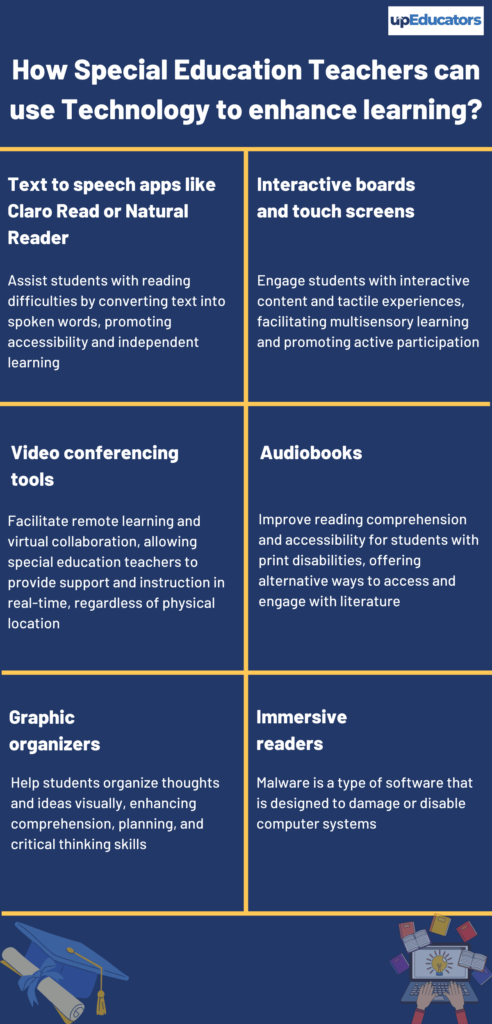
Credit: www.upeducators.com
Using Technology To Take Smart Breaks
Breaks are part of good study habits. Apps like Pomodoro timers (Focus Booster, Be Focused) help you study in short bursts (like 25 minutes), then take a 5-minute break.
The Pomodoro Technique
- Study for 25 minutes
- Take a 5-minute break
- Repeat 4 times, then take a longer break
Stat: According to the Draugiem Group, students using the Pomodoro method were 15% more productive than those who worked straight through.
Bonus tip: Use break time to stretch, drink water, or do a quick breathing exercise, not to scroll social media.
Tracking Progress With Data
Seeing your improvement keeps you motivated. Many study apps show graphs and stats—like hours studied, topics mastered, or streaks.
- Use apps with progress dashboards to spot patterns. For example, are you always missing study time on Mondays?
- Set small weekly goals and track them.
- Celebrate small wins—a week of daily study, or a new high score on a quiz.
Insight: If you spot a “bad day” trend, try studying at a different time or with a different method. Tech data helps you find what works best for you.
Avoiding Common Mistakes With Study Technology
It’s easy to let technology distract or overwhelm you. Here’s how to avoid the most common traps:
Quick Tip: Don’t try every app at once. Start with one new tool, use it for a week, and see if it helps. Too many apps can make you less productive.
Do’s And Don’ts Of Using Technology For Study
| Do | Don’t |
|---|---|
| Use apps to organize and set reminders | Download too many apps at once |
| Take digital notes and back them up | Rely only on memory or paper notes |
| Join online study groups for support | Study alone with no feedback |
| Take breaks with Pomodoro timers | Use breaks to scroll social media |
Making The Most Of Technology: Step-by-step
You don’t need to be a tech expert to build better habits. Here’s a simple plan:
- Pick one area to improve (organization, memory, focus, etc. ).
- Choose a tool or app that solves this problem.
- Set it up and use it for one week.
- Review your results—do you feel less stressed? Are you remembering more?
- Adjust or try another tool if needed.
For example: If you forget assignments, try Google Calendar for a week. If you still miss things, add a to-do app like Todoist.
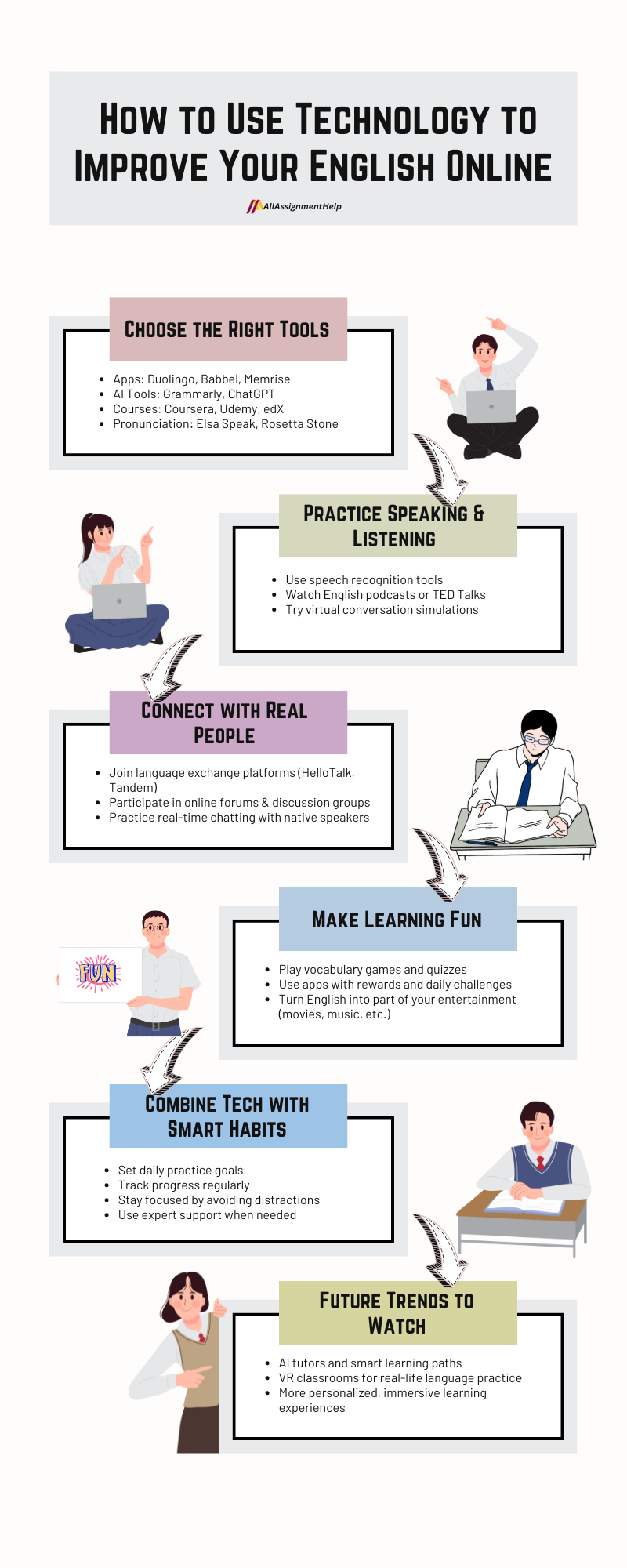
Credit: www.allassignmenthelp.com
Real-world Success Stories
Many top students use technology to get ahead. For example, medical students often use Anki to memorize thousands of terms. Language learners use Duolingo or Memrise for daily practice. Even working adults use calendar apps and digital notes to balance study with busy jobs.
Stat: According to the Education Technology Industry Network, schools using tech-supported study methods saw graduation rates rise by 12% over five years.
Additional Resources
If you want to learn more about how technology is changing education, check out Edutopia’s Technology Integration Guide for real-world examples and tips.
Building better study habits with technology is not about using every new tool. It’s about choosing what helps you stay organized, remember more, and work smarter—not harder. Start small, stay consistent, and adjust as you go. With the right tech, you can make study time more productive and even more enjoyable.

Credit: onlinedegrees.sandiego.edu
Frequently Asked Questions
How Can I Avoid Getting Distracted By Technology While Studying?
Turn off notifications, use website blockers, and set your device to “Do Not Disturb. ” Stick to apps that support your study goals and close everything else during study time.
What Are The Best Apps For Organizing My Study Schedule?
Top options include Google Calendar for planning, Todoist for to-do lists, and OneNote or Notion for keeping track of notes and assignments.
Can Technology Really Help Me Remember More?
Yes. Apps with spaced repetition (like Anki or Quizlet) are proven to boost long-term memory. Digital flashcards remind you to review at the right time.
Is It Better To Study Alone Or In An Online Group?
Both have benefits. Online study groups help with motivation and feedback, while solo study can be more focused. Try mixing both for best results.
Are There Risks To Using Too Much Technology For Studying?
Yes. Too much screen time can cause eye strain and tiredness. Take regular breaks, use “night mode” on screens, and don’t overload yourself with too many apps.
By following these steps and using technology wisely, you’ll not only improve your study habits but also set yourself up for long-term academic success.