The world of online learning is exploding. By 2026, the global e-learning market is expected to reach $457.8 billion, up from $250 billion in 2020. More people now want flexible, affordable, and skill-focused education. But with so many platforms, choosing the right one feels confusing—even for experts. Let’s break down the top online learning platforms for 2026, compare their strengths, and help you find the perfect match.
What Makes A Great Online Learning Platform?
A top platform must offer:
- High-quality courses (up-to-date, expert-led)
- Affordable pricing
- Flexible access (mobile, offline, self-paced)
- Strong support (community, mentors, customer service)
- Recognized certificates or degrees
- Engaging content (videos, quizzes, projects)
But not all platforms deliver on every point. Your goals—career change, side skills, university credit—will shape your best choice. For example, if you need a recognized qualification, you’ll want a platform that works with real universities. If you’re just curious or want to try something new, flexibility and cost might matter more than a certificate.
Another key to a great platform is how often the content is updated. In fast-moving fields like technology, a course from two years ago might already be outdated. The best platforms work closely with subject experts to refresh content regularly.
Support is also important—some platforms offer peer forums, while others provide direct contact with mentors or instructors. This can make a big difference if you get stuck or need encouragement.
Accessibility is often overlooked. Some platforms offer apps, offline downloads, or even lessons designed for learners with disabilities. Not every platform has subtitles or translations, so check if you need these features. The best platforms make learning possible anywhere and for everyone.
Top 10 Online Learning Platforms For 2026
Let’s look at the most recommended platforms, their features, and who they serve best.
1. Coursera
Coursera partners with top universities. You get access to real college classes and professional certificates.
- Strengths: University-backed courses, degrees, Google/Meta certifications, mobile app.
- Weaknesses: Some degrees are expensive, not all courses free.
Best for: Career changers, degree seekers, those wanting industry certificates.
A unique advantage is the range: you can study everything from data science to philosophy, and the platform provides clear learning paths. For example, their “Google IT Support Professional Certificate” is a popular path for those entering tech.
2. Edx
edX is a nonprofit led by Harvard and MIT. It has university courses, MicroMasters, and professional programs.
- Strengths: Ivy League content, affordable MicroDegrees, free audit options.
- Weaknesses: Verified certificates cost extra, fewer non-English courses.
Best for: Academic learners, those seeking affordable credentials.
EdX stands out for its strong academic focus and the option to “audit” courses for free, letting you try before you buy. Their MicroMasters programs are a cost-effective way to get graduate-level education without the full price tag.
3. Udemy
Udemy is a marketplace—anyone can teach, so topics are wide.
- Strengths: Huge variety, frequent sales (courses for $10–$20), lifetime access.
- Weaknesses: Quality varies, no official university partners.
Best for: Hobbyists, affordable upskilling, casual learners.
If you want to learn something niche—like drone photography or Excel macros—Udemy probably has it. Read reviews and check instructor backgrounds, since quality is not always consistent. The ability to access purchased courses forever is a strong plus.
4. Linkedin Learning
Formerly Lynda.com, LinkedIn Learning focuses on workplace skills.
- Strengths: Business/tech focus, integrates with LinkedIn profile, personalized recommendations.
- Weaknesses: No degrees, mostly short courses.
Best for: Working professionals, those building LinkedIn resumes.
You can add completed courses directly to your LinkedIn profile, making it easier to show employers your new skills. Their courses are often short, focused, and practical—great for busy schedules or building soft skills like leadership.
5. Futurelearn
FutureLearn offers short courses, microcredentials, and online degrees, mostly from UK/AU universities.
- Strengths: University partners, flexible microcredentials, clear career pathways.
- Weaknesses: Limited language options, some courses pricey.
Best for: UK/AU students, international learners seeking global degrees.
Their courses often include active discussions with other learners, helping you feel part of a class. The platform is especially known for healthcare, education, and social science topics.
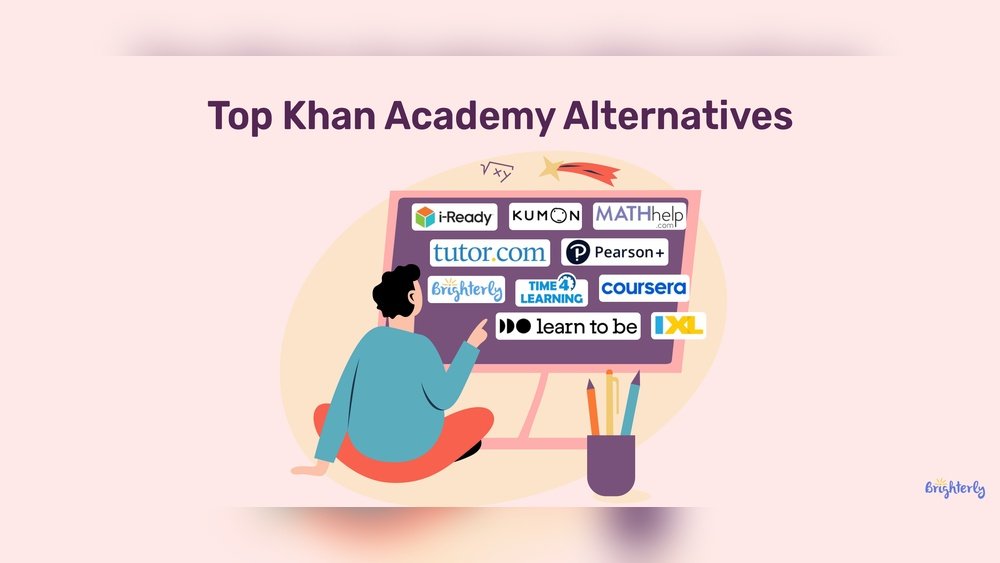
6. Khan Academy
Khan Academy is nonprofit, free, and covers K-12 to college prep.
- Strengths: 100% free, strong in math/science, bite-sized lessons, adaptive learning.
- Weaknesses: No certificates, limited adult/career training.
Best for: Students, parents, those needing basic math/science.
Khan Academy’s adaptive exercises help you find and fill gaps in your knowledge. It’s especially useful for standardized test prep (like SAT, GMAT) and for parents supporting children’s learning at home.
7. Skillshare
Skillshare is about creative and practical skills—design, video, photography.
- Strengths: Project-based, creative focus, community classes.
- Weaknesses: No certificates, subscription model only.
Best for: Designers, creatives, hobbyists.
Skillshare’s “class projects” encourage you to create something as you learn, which can be more engaging than just watching videos. The community is active, and feedback from peers can help you improve your skills quickly.
8. Masterclass
MasterClass features celebrity instructors—think Gordon Ramsay, Serena Williams.
- Strengths: High production value, inspiring teachers, creative skills.
- Weaknesses: No certificates, not career-focused.
Best for: Inspiration, creative growth, fans of celebrity teachers.
Each course feels like a documentary, with behind-the-scenes stories and personal advice from experts at the top of their fields. It’s ideal for motivation and seeing how the best in the world think and work.
9. Pluralsight
Pluralsight is for tech pros—software, IT, cybersecurity.
- Strengths: Up-to-date tech, skill assessments, learning paths.
- Weaknesses: Expensive, tech-only focus.
Best for: Developers, IT pros, teams upgrading tech skills.
Pluralsight’s skill assessments can help you see exactly what you need to study next. Their platform is used by companies to train IT teams, so content stays cutting-edge.
10. Udacity
Udacity offers “Nanodegrees” in AI, data, programming, and more.
- Strengths: Real-world projects, mentor support, job links.
- Weaknesses: Pricey, limited topics.
Best for: Job seekers in tech, those wanting portfolio projects.
A Nanodegree typically includes hands-on projects reviewed by experts, which you can add to your portfolio—vital for tech roles. Udacity’s career services (like resume feedback) add extra value for job hunters.
How The Platforms Compare: Key Features
Here’s a quick comparison of the top 5 platforms by the features students care about most.
| Platform | Degrees | Certificates | Price Range | Free Courses |
|---|---|---|---|---|
| Coursera | Yes | Yes | $0–$40,000 | Yes (audit) |
| edX | Yes | Yes | $0–$25,000 | Yes (audit) |
| Udemy | No | Yes | $10–$200 | Yes (limited) |
| LinkedIn Learning | No | Yes | $20–$40/mo | Yes (trial) |
| FutureLearn | Yes | Yes | $0–$25,000 | Yes (limited) |
Pros And Cons: Quick Comparison
Let’s break down the main advantages and disadvantages.
| Platform | Pros | Cons |
|---|---|---|
| Coursera | University-backed, wide topics, recognized certificates | Some courses expensive, less hands-on |
| Udemy | Affordable, variety, learn at own pace | Quality varies, no degrees |
| edX | Ivy League content, free to audit | Certificates cost, fewer soft skills |
| Skillshare | Creative focus, project-based, active community | No certificates, must subscribe |
| Khan Academy | Free, K-12 focus, adaptive practice | Not for career skills, no certificates |
Who Should Choose Which Platform?
Choosing depends on your goals, budget, and learning style. Here are common scenarios:
- You want a new job: Try Coursera, edX, or Udacity for recognized certificates.
- You’re a creative: Choose Skillshare or MasterClass for hands-on projects.
- You need academic support: Khan Academy for basics, FutureLearn for university courses.
- Your budget is tight: Khan Academy (free), Udemy (frequent discounts), edX audit mode.
- You want fast, practical skills: LinkedIn Learning, Udemy.
For example, if you want to become a web developer, a path could be: start with free basics on Khan Academy, practice hands-on coding on Udemy, and then get an industry certificate from Coursera or Udacity. If you’re a visual learner, platforms with lots of videos and project work (like Skillshare or MasterClass) will suit you better.
Think also about your motivation. If you often stop courses halfway, look for platforms with active communities or deadlines—these can help you stay on track.
Hidden Insights Most Beginners Miss
- Certificates aren’t equal. A Coursera/edX certificate with a university logo has more value with employers than one from a general platform. If your goal is to impress recruiters, look for “verified” or “official” certificates, not just proof of completion.
- Pay attention to updates. In tech, platforms like Pluralsight and Udacity update content monthly. Some older courses on Udemy can be outdated. Always check the “last updated” date before enrolling, especially for fast-changing fields.
- Community matters. Platforms with active forums or peer review (Coursera, Skillshare) keep you motivated and help you finish. Peer feedback can also give you new ideas and help you learn faster.
- Subscriptions vs. one-time fees. Udemy is pay-per-course; Skillshare and LinkedIn Learning are subscription only. Over time, one model may save you money. If you plan to take many courses in a year, a subscription could be cheaper in the long run.
Also, remember that project-based platforms (like Udacity or Skillshare) give you something to show employers—a finished portfolio is often more valuable than a certificate alone.
Credit: spotlightr.com
Common Mistakes When Choosing
- Focusing only on price: Cheaper isn’t always better; consider content quality and support. Free courses are great for exploring, but sometimes paying gives you access to feedback, projects, or updated material.
- Ignoring language options: Not all platforms offer subtitles or non-English courses. If you’re not comfortable with English, check for language support before you sign up.
- Assuming all certificates help your career: Only some are recognized by employers. Ask your network or check job postings to see which platforms matter in your field.
Another mistake: not checking refund policies. Some platforms let you try risk-free, while others don’t refund digital products. Read the terms before buying.
Practical Tips For Picking Your Platform
- Search for reviews and course ratings before enrolling. Look for recent feedback, since platforms can change over time.
- Try free trials or audit options before paying. Many platforms let you sample lessons or access part of the course for free.
- Look for platforms with mobile apps if you want to learn on the go. Offline access can be a lifesaver during travel or commutes.
- If you need a job, choose platforms with career services or real-world projects. Some, like Udacity, offer resume reviews or job guarantees for certain programs.
Also, set clear goals before you start. Are you learning for fun or for a job? Your answer should guide your platform choice and help you stick with your studies.
Credit: fortunerhub.com
Career-focused Platforms: When Credentials Matter
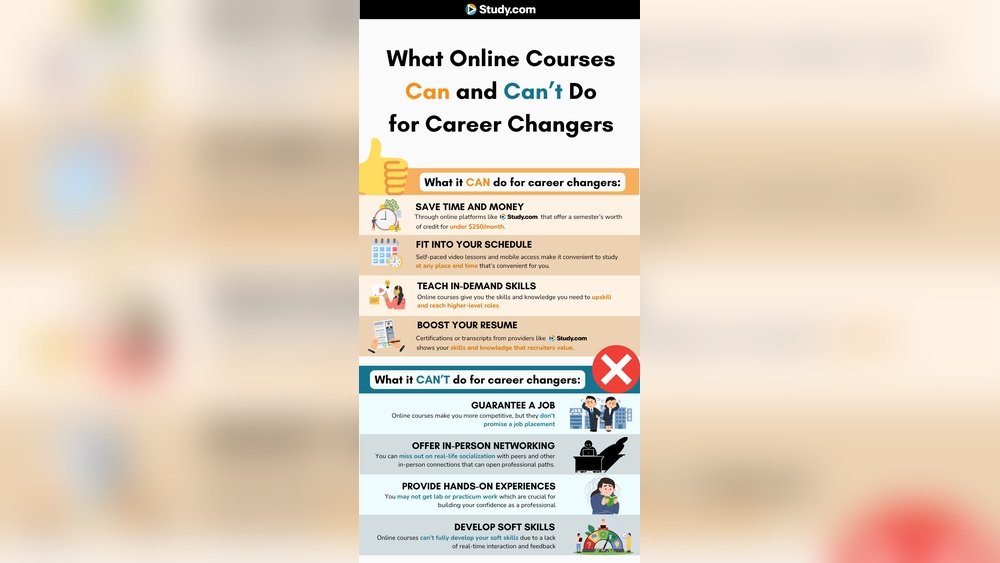
If you need a credential for a job or university, focus on platforms with official partners, like Coursera, edX, and FutureLearn. Some employers will reimburse or recognize certificates—always check before paying.
For example, Google, IBM, and Facebook offer certificates on Coursera that are recognized in the tech industry. Microcredentials from edX or FutureLearn can sometimes count toward a full degree later, saving you time and money.
Don’t forget to network as you learn. Many career-focused platforms have alumni groups or forums where you can meet peers and hear about job openings.
Myth Vs Fact: E-learning Edition
| Myth | Fact |
|---|---|
| All online courses are the same | Course quality, recognition, and support vary widely |
| Certificates guarantee a job | Certificates help, but skills and portfolios matter more |
| Only tech skills are valuable online | Business, design, and soft skills are also in demand |
Where To Start?
If you’re new, try free courses on Khan Academy, Coursera, or edX. Explore, then invest in paid options if you like the style and support. Look for introductory classes that match your interests and set a small, realistic goal—like finishing your first course in a month.
If you feel stuck, ask questions in course forums or join online study groups. Many learners give up because they feel alone, but community support can help you push through challenges.
key Takeaways:
- pick Platforms Based On Your Career, Budget, And Learning Style.
- Certificates and degrees matter for jobs, but not all are equal.
- Try before you buy—most sites offer free trials or sample lessons.
- community And Updated Content Help You Succeed Long-term.
Frequently Asked Questions
What Is The Most Affordable Online Learning Platform?
Khan Academy is completely free. For paid options, Udemy often has courses on sale for $10–$20, and edX offers free audit modes. You can often find coupons or wait for site-wide sales to save more.
Which Platform Is Best For Getting A Job?
Coursera, edX, and Udacity offer certificates and degrees recognized by many employers, especially in tech and business. These platforms often provide job-specific learning paths and sometimes even job placement support.
Can I Earn A Real Degree Online?
Yes, platforms like Coursera, edX, and FutureLearn partner with universities for real bachelor’s and master’s degrees. These are the same degrees you’d get on campus, but often cost less and offer more flexibility.
Are Online Certificates Worth It?
If the certificate is from a respected partner or shows real skill (like a portfolio project), it can help your resume. Always check employer recognition. Remember, showing how you applied your skills (in a project or internship) is often more important than just a piece of paper.
Where Can I Find More About E-learning Trends?
See the Wikipedia E-learning overview for research, statistics, and the latest trends.
—
No matter your learning goal, 2026 offers more choices than ever. With the right platform, you can build skills, earn credentials, and change your future—all online. Start with a free course, test different platforms, and never stop learning.

Credit: studyhub.org.uk