Quick answer: The best smart pens for note taking sync your handwriting from paper to a phone or tablet in real time. Our top pick, the Ophayapen Smart Pen with Mini Notebook, works with Android and iOS and keeps notes and drawings organized and easy to share. Expect some trade-offs: battery life may not last a full heavy day, and syncing can occasionally drop.
Fast-paced lectures can leave your notes messy or incomplete, and important ideas slip away when your pen can’t keep up with your thoughts. A smart pen helps close that gap, and this guide covers the best ones.
College life is busy, and good notes can make a big difference. That’s why finding the right smart pen is a standout upgrade. With the right tool, you can capture every word clearly and organize your notes easily. It turns a stressful note-taking session into a smooth, productive one.
If you’ve struggled with messy notebooks or lost ideas, you’re not alone. Below are the best smart pens to help you stay on top of your studies and make note-taking easier, so you can find the right pen for the way you work.




Stock and prices change often, so check the latest price and availability on Amazon.
1. Ophayapen Smart Pen+Mini notebok
- Brand: Ophayapen
- Manufacturer: ophayapen
- Dimensions: Weight: 0.33 lbs
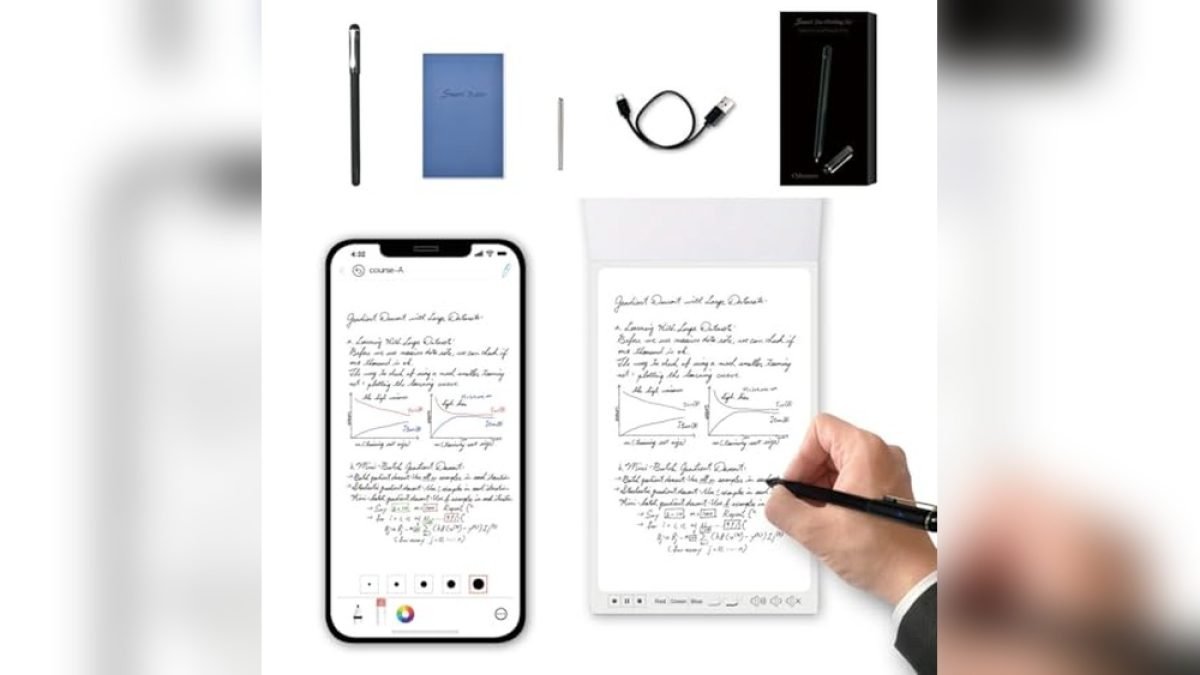
The Ophayapen Smart Pen and Mini Notebook offer a smooth writing experience. It captures your notes and drawings instantly. You can see your work on your phone or tablet right away. The pen feels comfortable and natural in your hand. It helps keep your notes organized and easy to find. Sharing your ideas with others is quick and simple. This smart pen works well in classrooms and offices alike. It connects easily to both Android and iOS devices. Many users enjoy how it blends traditional writing with modern technology. It makes note-taking and drawing more fun and efficient every day.
Advantages
- Capture notes instantly with real-time syncing to your devices.
- Save and organize drawings and writings digitally with ease.
- Compatible with Android and iOS for wide device support.
- Perfect for classrooms, offices, and creative note-taking.
- Reduces paper waste by storing notes electronically.
Disadvantages
- Battery life may not last a full day of heavy use.
- Syncing can be slow or sometimes lose connection.
- Writing feels different compared to regular pen and paper.
- Requires compatible devices with Android or iOS only.
- Small screen on the mini notebook limits space for notes.
Editorial Verdict & Best Fit
The Ophayapen Smart Pen+Mini notebook works smoothly for taking notes and drawing. It syncs your writing in real time to your phone or tablet. Perfect for classrooms and offices, it keeps all notes organized and easy to share. The pen feels comfortable and writes clearly on the mini notebook pages. Compatible with both Android and iOS, it fits many devices. This smart pen helps save time by digitizing notes quickly and simply. A useful tool for students and professionals alike.

2. Ophayapen Smart Sync Pen for Note Taking
- Brand: Ophayapen
- Manufacturer: Ophayapen
- Color: Black
- Dimensions: Height: 1.77 inches Width: 9.92 inches Length: 11.42 inches Weight: 2.44 lbs
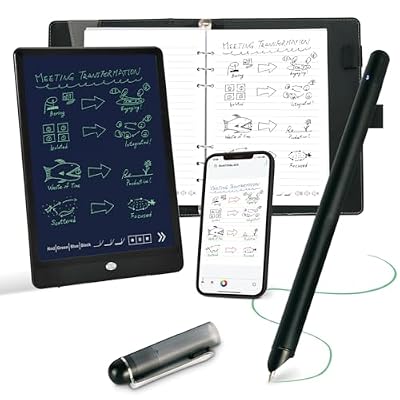
The Ophayapen Smart Sync Pen makes note-taking smooth and natural. It writes like a regular pen on paper but saves your notes digitally at the same time. You can see your writing appear on your smartphone or tablet instantly. This pen helps you keep all your ideas safe and easy to find. The notebook and writing board feel comfortable and familiar to use. Converting your handwritten notes into text is simple and fast. Sharing your notes with friends or colleagues takes just a few taps. Many users enjoy how this pen blends old-school writing with modern technology. It brings convenience without losing the joy of writing by hand.
Advantages
- Captures notes instantly and saves them on your device.
- Converts handwriting into editable text quickly and easily.
- Stores all your notes safely in one app.
- Shares your notes with friends or colleagues in seconds.
- Works smoothly on both Android and iOS smartphones.
Disadvantages
- Sync sometimes lags, causing delays in note digitizing.
- Requires regular charging, which may interrupt long sessions.
- Handwriting recognition may struggle with messy or unclear notes.
- Works best with specific notebooks and writing boards only.
- App interface can be confusing for new users at first.
Editorial Verdict & Best Fit
The Ophayapen Smart Sync Pen makes note-taking simple and fast. Notes transfer directly to a phone without delay, and writing is smooth and natural on paper. The app converts handwriting into text, and sharing notes with classmates or coworkers is quick and easy. Battery life lasts a full day of use, and setup is straightforward, with clear instructions included. The pen keeps all your notes organized in one place, a great tool for students and professionals alike.

For a deeper look at this model, read our full Ophayapen Smart Sync Pen review.
3. Mloas Smart Sync Pen for Note Taking
- Brand: Mloas
- Manufacturer: Canyier Technology
- Color: Gray
- Dimensions: Height: 6.8 inches Width: 0.98 inches Length: 9.45 inches
- Number of Pages: 160
The Mloas Smart Sync Pen makes note-taking smooth and easy. Writing feels natural, just like using a regular pen. Your handwriting appears instantly on your digital notebook. You can convert your notes into text quickly with OCR. It stores your notes offline, so you don’t worry about losing them. The pen also records audio, helping you capture important moments. Sharing your notes with friends or colleagues is simple and fast. It works well with both iOS and Android devices. Many enjoy how this pen blends traditional writing with smart technology. Using it feels comfortable and helps keep ideas organized.
Advantages
- Capture notes quickly with synchronized handwriting technology.
- Convert handwritten notes to editable text easily.
- Store notes offline without worrying about internet access.
- Record audio while writing for better memory support.
- Share notes instantly with friends or coworkers on iOS and Android.
Disadvantages
- Syncing may lag with weak Bluetooth connections.
- OCR feature sometimes misreads messy handwriting.
- Offline storage limits note capacity over time.
- Audio recording quality depends on the environment.
- Compatible apps occasionally crash on older devices.
Editorial Verdict & Best Fit
The Mloas Smart Sync Pen makes note-taking simple and clear. Writing syncs quickly to the digital notebook. OCR converts handwriting to text with good accuracy. Offline storage helps keep notes safe without internet. Audio recording adds a helpful layer to meetings or classes. Sharing notes is fast and easy with compatible apps. Works well on both iOS and Android devices. Battery lasts long enough for everyday use. A useful tool for students and professionals alike.
4. Smart Pen for Note Taking Set Real-Time Paper-to-Digital
- Brand: Ophayapen
- Manufacturer: Chase Publishing and Education Technology Corp.
- Color: Black
- Dimensions: Weight: 2.51 lbs
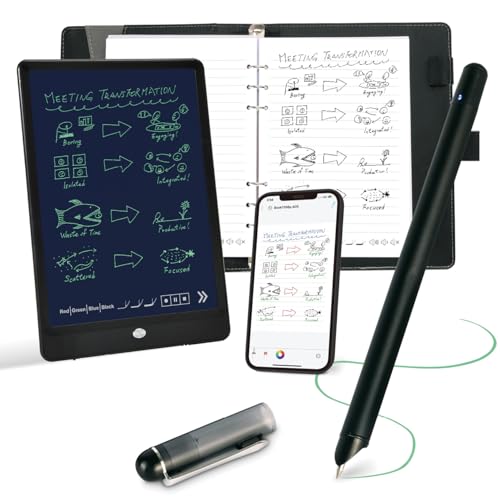
This smart pen set makes note-taking easy and natural. Writing is smooth and comfortable, just like using a regular pen. Your notes appear instantly on your phone or tablet. You can quickly convert handwriting to text for easy editing. It helps keep all your notes organized in one place. Sharing your ideas with friends or colleagues is simple and fast. The digital notebook works well for meetings, classes, or personal projects. It saves time by reducing the need to type or scan notes later. Using the app is friendly and clear, fitting both iOS and Android devices. Many enjoy how this pen blends old-school writing with new technology.
Advantages
- Effortlessly turns handwritten notes into digital text instantly.
- Saves time by storing all notes safely in one app.
- Makes sharing meeting or class notes quick and simple.
- Helps keep your work organized and easy to find.
- Works smoothly with both iOS and Android devices.
Disadvantages
- Battery life may be short during heavy use or long meetings.
- Sometimes handwriting recognition errors cause inaccurate text conversion.
- Requires a compatible smartphone or tablet for full functionality.
- Paper notebook refills can add extra cost over time.
- Learning curve exists for users unfamiliar with digital pen tools.
Editorial Verdict & Best Fit
This smart pen makes note-taking easy and fast. It converts handwriting to text instantly. The digital notebook syncs smoothly with a smartphone app. Sharing notes after meetings is simple and quick. Writing feels natural with the pen’s smooth flow. Storing all notes digitally helps keep me organized. The app works well on both iOS and Android. Perfect for students and professionals who take many notes. No more messy papers or lost notebooks. A helpful tool for saving time and effort.

5. Digital Pen Writing Set – Smart Pen for Note-Taking with Notebook
- Brand: Yuan
- Manufacturer: Yuan
- Dimensions: Weight: 1.43 lbs
The Digital Pen Writing Set is smooth and natural to write with. It lets you write on paper while saving your notes digitally. Watching your handwriting appear on your device screen is satisfying and helpful. The notebook is designed to work perfectly with the smart pen. You can easily share your notes with friends or colleagues. This set makes meetings and study sessions more organized and enjoyable. It helps you keep all your ideas safe and easy to find. Many people like how simple it is to use every day. It makes note-taking faster and less messy. This set is a thoughtful gift for anyone who loves writing or technology.
Advantages
- Saves time by turning handwritten notes into text instantly.
- Keeps notes organized and easy to find on devices.
- Supports sharing notes quickly with friends or coworkers.
- Works smoothly with paper, combining classic and digital writing.
- Makes meetings and study sessions more productive and clear.
Disadvantages
- Battery life may not last through long meetings or classes.
- Syncing errors can cause delays in converting handwriting to text.
- Requires special notebook paper to work properly with the pen.
- Learning curve for new users to operate the digital features.
- Higher price compared to regular pens and notebooks.
Editorial Verdict & Best Fit
This Digital Pen Writing Set makes note-taking easy and fast. Writing on paper is natural, yet everything is saved digitally, and notes sync to a phone in real time, which is very convenient. The pen and notebook work well together and are comfortable to use. Sharing and storing notes is simple and saves a lot of time. A thoughtful gift for anyone who likes tech and writing, it suits meetings, school or personal use. The quality is good, and the pen writes smoothly. A smart choice for daily note-taking.

Prefer to skip the electronics in the pen? A reusable cloud-syncing notebook is a simpler alternative.
6. XNote Smart Pen & Notebook Starter Set – AI-Powered Digital Note Taking
- Brand: Xnote
- Manufacturer: Xnote
- Color: Black
The XNote Smart Pen & Notebook Starter Set feels natural and smooth to write with. It captures your real paper notes and sends them instantly to your app. The pen connects easily via Bluetooth for quick syncing. You can write freely without worrying about battery life thanks to its 17-hour power. The notebook is smart and helps keep your ideas organized. Using this set makes note-taking simple and enjoyable. It includes five ink refills, so you can keep writing without interruption. Many enjoy how it blends traditional writing with modern technology effortlessly. This set feels personal and helps you stay productive every day.
Advantages
- Writes on real paper but saves notes digitally to the app.
- Syncs your handwriting instantly via Bluetooth for easy access.
- Long 17-hour battery life supports all-day note-taking needs.
- Comes with five ink refills for continuous writing without worry.
- Helps organize and store notes neatly, reducing paper clutter.
Disadvantages
- Battery lasts up to 17 hours, which may be short for heavy users.
- Bluetooth connection can sometimes be unstable or slow to sync notes.
- Requires buying special ink refills, adding to long-term costs.
- App interface might be confusing for beginners or older users.
- Real paper pages are limited; you need to replace notebooks often.
Editorial Verdict & Best Fit
The XNote Smart Pen & Notebook Starter Set works smoothly and feels natural to use. Writing on real paper while the app saves notes instantly is very helpful. Bluetooth connection stays strong, making syncing fast and easy. Battery life lasts a long time, so no worries about charging often. The set includes five ink refills, which is great for long use. Overall, it makes note-taking simple and neat. Perfect for students and professionals who like paper and digital tools together.

7. Ophaya Sync Smart Pen and A5 Notebook(5-Pack)
- Brand: OPHAYA
- Manufacturer: ophaya
- Color: Brown
The Ophaya Sync Smart Pen and A5 Notebook set offers a smooth and natural writing experience. It feels just like using a regular pen on paper. Notes are instantly saved to your phone or tablet, making organization simple and fast. The pen converts handwriting into editable text, saving time and effort. This set is perfect for adults, students, teachers, and coworkers who enjoy writing by hand but want digital convenience. The notebooks have a comfortable size and sturdy pages, ideal for everyday use. Users appreciate how easy it is to keep all notes in one place without losing the personal touch of writing. It makes note-taking more enjoyable and less stressful. This smart pen and notebook combo is a thoughtful gift for anyone who loves to write.
Advantages
- Capture notes quickly and see them on your phone instantly.
- Convert handwriting into text for easy editing and sharing.
- Use the pen and notebook anywhere without carrying extra gadgets.
- Perfect for teachers, students, and coworkers to stay organized.
- Gift set includes five notebooks, great for daily note-taking.
Disadvantages
- Syncing sometimes takes longer than expected.
- Pen requires frequent charging during heavy use.
- Handwriting recognition may not always be accurate.
- Notebook pages are limited and replaceable only by specific packs.
- App compatibility might vary with older phone models.
Editorial Verdict & Best Fit
The Ophaya Sync Smart Pen works smoothly and saves notes instantly to a phone. Writing is natural and easy, and the A5 notebooks are a practical size and good quality. Converting synced notes to text saves lots of time for studying and work. It makes a great gift for teachers, students and coworkers. The battery lasts long, and the pen is comfortable to hold. Notes stay clear and neat after syncing, and setup is simple. A smart way to keep all your ideas organized without extra effort.
Frequently Asked Questions
What Features Make Smart Pens Best for College Note-taking?
Smart pens with audio recording and handwriting-to-text conversion help capture notes clearly. Good battery life and easy syncing also matter for college use.
How Do Smart Pens Improve Note Organization for Students?
Smart pens can tag and store notes digitally, making them easy to find. This saves time and reduces the chance of losing important information.
Can Smart Pens Work with Different Types of Paper?
Many smart pens work best with special paper, but some can record on regular paper too. Check the pen’s compatibility before buying.
Are Smart Pens Compatible with Popular Note-taking Apps?
Most smart pens sync with apps like Evernote and OneNote for easy editing. This helps students review and organize notes on their devices.
How to Choose the Best Smart Pens for Note Taking
1. Check Compatibility with Your Devices
Ensure the smart pen works with your phone, tablet, or laptop. Not all pens connect to every device. Look for Bluetooth or USB options that suit your gadgets.
2. Consider Battery Life and Charging
Long battery life keeps the pen working through classes. Quick charging is helpful for busy days. Choose a pen that lasts at least a full school day.
3. Look for Easy Note Syncing
Notes should transfer smoothly to your apps. Some pens save notes as text or images. Find one that fits your preferred note-taking method.
4. Evaluate Writing Comfort and Grip
Writing for hours needs a comfortable pen design. Check if the pen feels good in your hand. A light and balanced pen reduces hand strain.
5. Review Note Storage and Organization Features
Smart pens with good storage hold many notes. Built-in organization tools help find notes faster. Choose one with easy ways to sort and search notes.
6. Assess Writing Accuracy and Responsiveness
Accurate writing ensures clear digital notes. Test the pen for smooth, lag-free writing. High responsiveness makes note-taking easier and faster.
7. Compare Price and Warranty Offers
Pick a pen that fits your budget and needs. Check if the price matches the features offered. A warranty provides safety against defects or problems.
A smart pen works best with a clear system, so try one of these note-taking methods for college.
Final Buying Takeaway
Choosing the right smart pen can make note-taking in college easier and faster. These pens help you keep your notes organized and easy to review. They also save time by turning handwriting into digital text. Whether you prefer writing by hand or typing, a smart pen fits your style.
Think about your budget, needed features, and how you like to study. A good smart pen can help you stay focused and improve your learning. Remember, the best pen is one you feel comfortable using every day. Take your time to pick the one that matches your needs.
With the right smart pen, studying becomes less stressful and more productive. Start making your college life simpler and your notes clearer with a smart pen. It is a small tool that can bring big help.
To optimize your digital workstation and productivity, explore our in-depth walkthrough on earning college credit through online coursework and student tech setups.
Join 5,000+ Curious Students & Lifelong Learners
Get our weekly breakdown of verified student discounts, proven study frameworks, and dorm tech essentials—straight to your inbox. Zero spam, unsubscribe anytime.
Our Editorial Standards & Review Methodology
Every guide, study method, and student product review on Eduventurely is independently researched, curated, and evaluated for academic utility, build quality, and real-world value. We never accept paid placements, sponsored reviews, or biased manufacturer rankings. When you choose to purchase through our links, we may earn an affiliate commission at zero additional cost to you. Read our full editorial & testing policy →