Quick answer: The best drawing tablets for art students start with the HUION Inspiroy H640P, a compact 6 x 4 inch tablet with 8,192 pen pressure levels, a battery-free stylus, six hotkeys, and Mac, PC, and mobile support. If you want more room to draw, the UGEE M708 offers a 10 x 6 inch area, 16,384 pressure levels, and eight hotkeys.
Drawing on a regular screen often means fighting for every line, and the lack of precision is a common frustration for art students who want their digital work to match their skill.
Drawing with a mouse or touchpad just doesn’t capture the true feel of sketching on paper. This can make creating art feel slow and discouraging. Choosing the right drawing tablet changes everything. It brings your ideas to life more naturally and helps you work faster and with more confidence.
The right tablet fits your style and budget and makes daily practice more enjoyable. This guide covers the best options for art students and shows how they compare, so you can find a drawing tablet that truly works for you and take your creative work further.


Availability varies by season; check the current listing on Amazon.
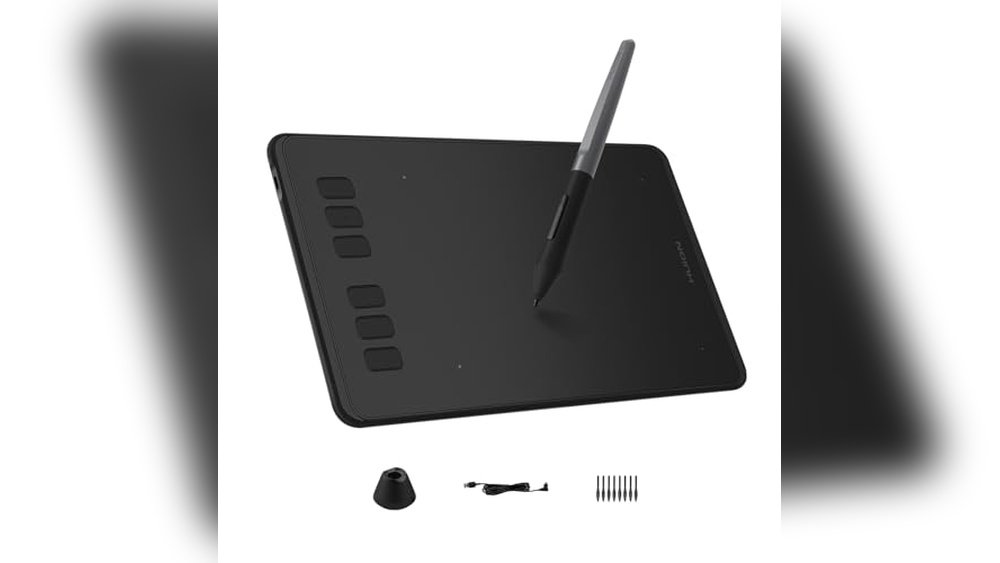
1. HUION Inspiroy H640P Drawing Tablet
- Brand: HUION
- Manufacturer: Shenzhen Huion Animation Technology LTD.
- Color: Black
- Dimensions: Height: 0.31 inches Width: 5.98 inches Length: 10.00 inches Weight: 0.6 lbs
The HUION Inspiroy H640P Drawing Tablet offers a natural drawing experience. Its 6×4 inch size is comfortable and easy to carry, and the battery-free stylus is light and responsive for long sessions. With 8192 levels of pen pressure, strokes come out precise and detailed. Six customizable hot keys speed up your workflow. It handles drawing, writing and designing on Mac, PC and mobile devices. Many users appreciate how simple and reliable it is for both creative work and teaching. A practical tool that fits into any creative routine.
Advantages
- The HUION Inspiroy H640P offers precise drawing with 8192 pen pressure levels.
- Battery-free stylus means no charging, ready to use anytime.
- Compact 6×4 inch size fits easily on any desk or workspace.
- Six customizable hotkeys speed up work by saving shortcuts.
- Compatible with Mac, PC, and mobile devices for flexible use.
Disadvantages
- Small active area may limit detailed drawing space.
- No multi-touch support for finger gestures or zoom.
- Only six customizable hotkeys, fewer than some tablets.
- Stylus lacks eraser button, reducing quick correction ease.
- Requires driver installation, which can be tricky for beginners.
Editorial Verdict & Best Fit
This HUION Inspiroy H640P tablet feels very smooth and easy to use. The pen does not need batteries, which is very convenient. Pressure sensitivity is excellent, making drawings look natural and detailed. Six hot keys speed up my work, saving time. Compatible with Mac, PC, and mobile, it fits all my devices. A perfect tool for drawing, writing, and design tasks. Compact size makes it easy to carry anywhere. Overall, a great choice for beginners and pros alike.

2. Drawing Tablet, UGEE M708 10 x 6 inch Large Drawing Tablet
- Brand: UGEE
- Manufacturer: Frunsi
- Color: Black
- Dimensions: Height: 0.32 inches Width: 8.28 inches Length: 14.09 inches Weight: 2.38 lbs
The UGEE M708 drawing tablet offers a smooth and natural drawing experience. Its large 10 x 6 inch surface gives plenty of space to create. The passive stylus feels light and comfortable in hand. Pressure sensitivity of 16,384 levels allows for precise and detailed artwork. Eight customizable hot keys make shortcuts easy and save time. This tablet works well for painting, designing, and sketching on your PC. Users enjoy how responsive and accurate the pen feels. It helps artists focus on their creativity without distractions. The tablet’s simple setup makes it friendly for beginners and experts alike. Overall, it provides a relaxed and enjoyable way to bring ideas to life.
Advantages
- Offers a large 10 x 6 inch drawing area for detailed work.
- Features 8 hot keys for quick access to favorite tools.
- Uses a passive stylus with 16384 pressure levels for smooth lines.
- Compatible with PC software for painting, designing, and sketching.
- Lightweight and easy to carry for art creation anywhere.
Disadvantages
- Surface may feel slippery for some users.
- No screen display; drawing relies on separate monitor.
- Pen lacks eraser button, limiting quick corrections.
- Hot keys placement might not suit all hand sizes.
- Drivers can be tricky to install on some PCs.
Editorial Verdict & Best Fit
The UGEE M708 drawing tablet offers a large 10 x 6 inch surface that is smooth and comfortable to work on. Eight hot keys put shortcuts at your fingertips and speed up work. The passive stylus is light and needs no batteries. Pressure sensitivity handles both fine lines and bold strokes, and setup with a PC is quick and simple. It supports detailed digital art without lag, making it a solid choice for beginners and hobby artists alike.

Want to draw without a computer? Our UGEE Pad standalone tablet review covers a screen-based option.
3. Drawing Tablet XPPen StarG640 Digital Graphic Tablet 6×4 Inch Art Tablet
- Brand: XPPen
- Manufacturer: XP-PEN
- Color: StarG640 Black
- Dimensions: Height: 0.1 inches Width: 6.5 inches Length: 7.5 inches Weight: 0.37 lbs
The XPPen StarG640 is a smooth and responsive drawing tablet. Its 6×4 inch size feels just right for detailed work and easy transport. The battery-free stylus pen glides naturally on the surface, making drawing and writing comfortable. Users enjoy how precise and light the pen feels in their hand. It works well with Mac, Windows, and Chromebook, fitting different needs like art, learning, and remote work. The tablet’s design is simple and user-friendly, helping anyone start quickly. Many find it a reliable tool for creativity and daily tasks.
Advantages
- Offers precise drawing with a responsive battery-free stylus pen.
- Compatible with Mac, Windows, and Chromebook for wide use.
- Compact 6×4 inch size fits easily on any desk.
- Supports drawing, e-learning, and remote work smoothly.
- Lightweight design makes it easy to carry anywhere.
Disadvantages
- Small drawing area limits large or detailed artwork.
- No multi-touch support for finger gestures or zooming.
- Some users report pen lag during fast strokes.
- Lacks customizable shortcut keys for quick access.
- Requires flat surface; no stand or adjustable angle.
Editorial Verdict & Best Fit
This drawing tablet is easy to set up and works well with Mac, Windows, and Chromebook. The battery-free stylus feels light and comfortable, making long drawing sessions easier. It is very responsive, capturing every stroke smoothly without delay. The 6×4 inch size is perfect for both drawing and remote work tasks. Great for students and artists who want a simple, reliable tool for e-learning and creativity. The tablet’s compact design fits well on any desk and is easy to carry around. Overall, a solid choice for anyone needing a budget-friendly digital art tablet.

Long digital painting sessions can heat up a laptop, so a student laptop cooling pad is a useful add-on.
4. Graphic Drawing Tablet, Digital Sketch, Design
- Brand: ienRon
- Manufacturer: ienRon
- Color: Black
- Dimensions: Height: 0.1 Inches Width: 9.39 Inches Length: 13.99 inches Weight: 1.1 lbs
The Graphic Drawing Tablet offers a smooth and natural drawing experience. Its battery-free pen feels light and easy to control. The adjustable ergonomic stand keeps your hand comfortable during long sessions. With 12 hot keys, you can quickly access your favorite tools. The tablet works well with Windows, Mac, and Android devices. It has a large active area of 10 by 6.25 inches, giving you plenty of space to create. The 16,384 pressure levels capture every detail and stroke. Many users enjoy how intuitive and precise it feels for sketching and design work. This tablet makes digital art simple and enjoyable.
Advantages
- This tablet offers smooth, precise drawing with 16384 pressure levels.
- Compatible with Windows, Mac, and Android devices for wide use.
- Adjustable ergonomic stand helps keep a comfortable drawing position.
- Battery-free pen means no charging or interruptions during work.
- Twelve hot keys allow quick access to favorite tools and commands.
Disadvantages
- Some users find the 12 hot keys hard to customize.
- The adjustable stand may feel less stable on uneven surfaces.
- Compatibility can vary with some Android devices.
- Battery-free pen may lose sensitivity over long use.
- Tablet size might be too large for small desks.
Editorial Verdict & Best Fit
This graphic drawing tablet feels very smooth and natural to use. The battery-free pen responds well with 16,384 pressure levels. Hot keys make drawing faster and easier on Windows, Mac, or Android devices. Its adjustable stand helps keep a good, comfortable angle for long work sessions. The size, 10 by 6.25 inches, is perfect for detailed sketches without feeling cramped. Setup was quick and simple, even for beginners. Overall, a solid tool for digital art and design.

5. HUION Inspiroy H430P Drawing Tablet 4.8×3 Graphic Tablet
- Brand: HUION
- Manufacturer: ShenZhen Huion Animation Technology Co., LTD
- Color: Black
- Dimensions: Height: 0.31 inches Width: 5.51 inches Length: 7.36 inches Weight: 0.03 lbs
The HUION Inspiroy H430P Drawing Tablet offers a natural drawing feel. Its battery-free stylus is light and comfortable for long sessions, and the compact size suits desks and small spaces. Four hot keys help you work faster and stay focused. It works with Mac, PC, Linux and mobile devices, which adds flexibility. Buyers like its responsive surface, which captures each stroke accurately. It handles drawing, writing, designing and teaching, and it keeps creative work simple and enjoyable.
Advantages
- Offers smooth and precise drawing with a battery-free stylus.
- Four customizable hot keys speed up your workflow.
- Compatible with Mac, PC, Linux, and mobile devices.
- Compact size fits easily on any desk or workspace.
- Ideal for drawing, writing, design, teaching, and work tasks.
Disadvantages
- Small active area limits large or detailed drawings.
- Stylus pressure sensitivity may feel less precise for some.
- Hot keys are few and may not suit all workflows.
- No screen display requires looking at a separate monitor.
- Some users report driver installation can be tricky.
Editorial Verdict & Best Fit
The HUION Inspiroy H430P drawing tablet is smooth and easy to use. The battery-free stylus works without charging, and four hot keys speed up work. It connects easily to Mac and PC and handles drawing, writing and design tasks. The tablet’s size fits neatly on a study desk, and it responds quickly to every stroke. Setup is simple, so you can start creating right away. A good choice for beginners and pros alike, and a strong fit for art, teaching and daily work.

Teaching art at home? See our guide to the homeschool workbooks by grade.
6. Ugee Drawing Tablet 6.5×4 Inches Computer Graphics Tablets
- Brand: UGEE
- Manufacturer: ugee
- Color: purple
- Dimensions: Height: 5.12 inches Width: 6.69 inches Length: 8.66 inches Weight: 0.61 lbs
The Ugee Drawing Tablet offers a smooth and natural drawing experience. Its 6.5×4 inch size is compact and easy to carry. The battery-free stylus feels light and comfortable in hand. With 8192 pressure sensitivity levels, it captures every detail and stroke. The 60° tilt function lets you create shading with ease. Ten hot keys provide quick access to favorite tools. It works well with PC, Mac, Windows, and Android devices. Artists enjoy its responsive surface and precise control. This tablet helps you focus on creativity without distractions.
Advantages
- Offers smooth drawing with 8192 pressure sensitivity levels.
- Includes 10 hot keys for quick access to tools.
- Supports tilt function for natural pen strokes.
- Works well with PC, Mac, Windows, and Android devices.
- Battery-free stylus means no charging or interruptions.
Disadvantages
- Small active area limits detailed drawing space.
- Hot keys may be hard to customize for some users.
- Stylus lacks eraser button found on other models.
- Tablet may feel less responsive on some Android devices.
- No built-in screen, so drawing feels less natural.
Editorial Verdict & Best Fit
This Ugee Drawing Tablet is easy to use. The light stylus works without batteries, and pressure sensitivity helps students draw natural-looking lines. Ten hot keys save time on common tasks. It works with Windows and Android devices, and its size suits drawing while still fitting on a study desk. The tilt function adds control, and setup is quick and simple. A great option for beginners and anyone who wants a reliable tablet.

7. XPPen 6 * 4 inch Drawing Tablet
- Brand: XPPen
- Manufacturer: XP-PEN
The XPPen 6 * 4 inch Drawing Tablet offers a natural feel under your hand. Its battery-free stylus responds quickly and accurately to every stroke, and 16,384 pressure levels allow detailed art. The 60° tilt support makes shading simple and comfortable. It works with Android, Windows and macOS devices. Beginners like how easy it is to start drawing right away. The tablet fits on any desk and is light to carry. It brings digital drawing close to traditional sketching, and many users say it helps them express their creativity with ease.
Advantages
- Offers precise drawing with 16,384 pressure levels for detail.
- Battery-free stylus means no charging or extra weight.
- Supports 60° tilt for natural and smooth shading effects.
- Works well with Android, Windows, and macOS devices.
- Compact 6×4 inch size fits small spaces and travel.
Disadvantages
- Small active area may limit large drawings or detailed work.
- No built-in screen, so you must look at the monitor.
- Some users report driver installation issues on certain systems.
- Stylus buttons can be hard to customize or use.
- Limited shortcut keys compared to higher-end drawing tablets.
Editorial Verdict & Best Fit
The XPPen drawing tablet is smooth and very easy to use. Pressure sensitivity creates fine and bold lines naturally, and the battery-free stylus works without delays or charging. Tilt support makes shading easier and more natural. Compatibility with Android, Windows and macOS covers a range of devices. The compact drawing surface suits beginners, setup is quick and the tablet responds accurately to each stroke. Great value for a digital art tablet at this price point.
Frequently Asked Questions
What Features Should Art Students Look for in Drawing Tablets?
Art students need tablets with pressure sensitivity, good screen size, and pen accuracy. These features help create detailed and smooth artwork easily.
Which Drawing Tablets Are Best for Beginners in Art?
Tablets with user-friendly software and affordable prices are best for beginners. Brands like Wacom and Huion offer great options for new artists.
How Important Is Screen Size for Art Student Tablets?
A larger screen gives more space to draw and detail work. However, portability matters too, so balance size with ease of carrying.
Can Drawing Tablets Improve Art Skills for Students?
Yes, tablets allow practice with digital tools and effects not possible on paper. Regular use helps students learn and improve faster.
How to Choose the Best Drawing Tablets for Art Students
1. Screen Size and Resolution
Select a tablet with a screen size that suits your workspace. Larger screens offer more drawing area but cost more. High resolution ensures clear, sharp images and smooth lines.
2. Pressure Sensitivity
Choose a tablet with high pressure sensitivity for better line control. It helps create thick or thin strokes easily. Look for at least 2048 levels for smooth drawing.
3. Pen Quality and Responsiveness
A good pen feels natural and responds quickly. Check if the pen is battery-free or rechargeable. Comfort is important for long drawing sessions.
4. Compatibility with Software
Make sure the tablet works with popular art software like Photoshop or Illustrator. Compatibility ensures you can use your favorite tools without issues.
5. Portability and Design
Lightweight and slim tablets are easier to carry to classes. A sturdy design lasts longer and handles everyday use well.
6. Price and Budget
Set a budget before choosing a tablet. Some models offer great features at lower prices. Balance cost with the features you need.
7. Additional Features
Look for extra buttons or touch controls for quick shortcuts. Some tablets include stands or glove accessories to improve comfort.
Final Buying Takeaway
Choosing the right drawing tablet can make a big difference for art students. It helps improve skills and brings ideas to life. Consider the tablet’s size, pressure sensitivity, and budget. A good tablet should feel comfortable and work well with art software.
Remember, the best tablet is one that fits your needs and helps you practice every day. Take your time to compare options before buying. With the right tool, drawing becomes easier and more fun. Keep creating, learning, and exploring new styles.
Your art journey will grow with the right tablet by your side.
To optimize your digital workstation and productivity, explore our in-depth walkthrough on earning college credit through online coursework and student tech setups.
Join 5,000+ Curious Students & Lifelong Learners
Get our weekly breakdown of verified student discounts, proven study frameworks, and dorm tech essentials—straight to your inbox. Zero spam, unsubscribe anytime.
Our Editorial Standards & Review Methodology
Every guide, study method, and student product review on Eduventurely is independently researched, curated, and evaluated for academic utility, build quality, and real-world value. We never accept paid placements, sponsored reviews, or biased manufacturer rankings. When you choose to purchase through our links, we may earn an affiliate commission at zero additional cost to you. Read our full editorial & testing policy →