Quick answer: The best tablets for students in college balance note-taking, battery life, and portability. The Samsung Galaxy Tab S10 Lite is our top pick, pairing a 10.9-inch screen with an included S Pen, up to 16 hours of battery life, and storage expandable to 2TB. The Lenovo Idea Tab Pro Student Edition adds a larger 12.7-inch 3K display, a pen, and a folio case.
Finding the best tablets for college students in 2027 means looking for devices that balance power, portability, and battery life. These tablets need to handle note-taking, reading, and multitasking without slowing down. A good screen size and comfortable keyboard options also make a big difference during long study sessions. Whether it’s for research, streaming lectures, or organizing schedules, the right tablet can simplify daily tasks. With so many choices available, it’s important to focus on features that truly matter for college life. Here is what makes a tablet stand out for students this year.
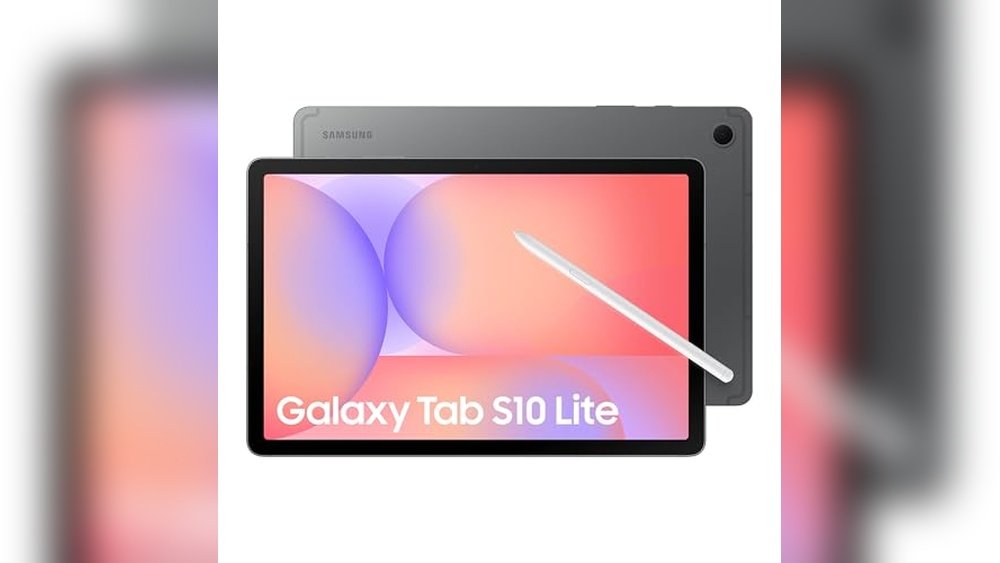
Samsung Galaxy Tab S10 Lite Tablet
For students looking for one of the Best Tablets for College Students 2027, this Samsung Galaxy Tab S10 Lite offers a balanced mix of performance and portability ideal for note-taking and media consumption.
.ap-btn { transition: transform .15s ease, filter .15s ease; } .ap-btn:hover { transform: translateY(-1px); filter: brightness(.95); }
Everyday Use Highlights
- Bright 10.9-inch LCD screen with Vision Booster adjusts well to different lighting.
- Integrated S Pen makes note-taking and drawing straightforward during lectures.
- Battery life supports long study sessions, lasting up to 16 hours on a charge.
- Expandable storage up to 2TB lets you keep plenty of files and apps without worry.
- Exynos 1380 processor handles multitasking and media smoothly.
Considerations Before Buying
- Weighs just over a pound but might feel a bit bulky for one-handed use.
- LCD screen isn’t OLED, so blacks and contrast aren’t as deep as premium tablets.
- Super Fast Charging is convenient but still takes about two hours for a full charge.
Thoughts on Fit and Function
This tablet fits well for students who prioritize note-taking and media viewing in a mid-sized form factor. The S Pen is a practical tool that reduces the need for separate accessories and helps keep study flow uninterrupted. Battery endurance means fewer interruptions for charging during a busy day.
Stock and prices change often, so check the latest price and availability on Amazon.
On the downside, if you want the deepest contrast for watching movies or prefer an ultra-light device, this might not be ideal. The tablet performs well but doesn’t push the boundaries for gaming or intensive creative work.
Finding Your Study Companion
If your day involves a mix of reading, writing, and streaming lectures, this Samsung tablet offers a calm and reliable experience. It suits those who want a simple but effective tool without overcomplication. However, if you need an ultra-portable tablet or the highest display quality, consider other options.
A practical tip: pair the device with a simple cover that doubles as a stand to ease long note-taking sessions. Overall, the Galaxy Tab S10 Lite is a solid choice that balances features thoughtfully for the college environment.
Even with long battery life, a full day of classes can drain a tablet, so a power bank for campus days is worth keeping in your bag.
Lenovo Idea Tab Pro Student Edition
For college students seeking the Best Tablets for College Students 2027, this Lenovo tablet balances performance and portability well.
.ap-btn { transition: transform .15s ease, filter .15s ease; } .ap-btn:hover { transform: translateY(-1px); filter: brightness(.95); }
The Lenovo Idea Tab Pro Student Edition is a lightweight tablet designed to support college-level work and entertainment. It addresses the common issue of balancing performance with portability, highlighted by its MediaTek Dimensity 8300 processor that delivers smooth multitasking and fast downloads. The 12.7” 3K LCD display enhances viewing, making reading and streaming clearer.
Using this tablet feels efficient and comfortable. The long battery life and quick charging reduce interruptions, while the responsive touch screen and included pen add flexibility for note-taking and creativity. It handles daily student tasks confidently, saving time and minimizing hassle.
Everyday Use Highlights
- Bright, sharp display suitable for reading and videos.
- Strong processor ensures smooth multitasking and app use.
- Lightweight design makes it easy to carry between classes.
- Battery supports long study sessions with quick recharge.
- Includes pen and folio case for note-taking and protection.
Considerations Before Buying
- Limited storage at 128 GB may require cloud use for large files.
- Weight, though light, is slightly higher compared to some ultra-thin tablets.
- Google Gemini integration may have varying compatibility depending on apps.
Choosing This Lenovo Tablet
This tablet fits students who want a reliable all-rounder with a strong display and solid battery life for both study and downtime. Its built-in pen is a practical addition for handwritten notes or sketches. However, if you need more storage or prefer a lighter device, this might not be the best match.
For those who value performance over ultra-lightweight design, it offers confidence for everyday use. Keep in mind that cloud storage can supplement its moderate internal space, making it manageable for coursework.
A Thoughtful Pick for Focused Students
If you’re balancing multiple classes and need a tablet that performs well for note-taking, streaming, and multitasking, this Lenovo Idea Tab Pro is worth considering. It’s well-suited for students who appreciate a crisp screen and a dependable battery.
Skip this model if you prioritize minimal weight or require extensive offline storage. A practical tip is to pair it with cloud services to overcome storage limits smoothly. Overall, it’s a steady choice that supports your daily academic routine without fuss.
Apple iPad 11-inch Blue 128gb
For students seeking the Best Tablets for College Students 2027, this iPad model suits those wanting a reliable and versatile device for study and creativity.
.ap-btn { transition: transform .15s ease, filter .15s ease; } .ap-btn:hover { transform: translateY(-1px); filter: brightness(.95); }
Everyday Use Insights for College Tasks
- Fast A16 chip handles multitasking and apps smoothly.
- 11-inch Liquid Retina display offers clear visuals for notes and media.
- All-day battery supports long study sessions without charging breaks.
- Wi-Fi 6 ensures stable and quick internet connectivity on campus.
- Lightweight design makes it easy to carry between classes.
Considerations Before You Decide
- 128GB storage might fill up quickly with large files or apps.
- No cellular option, so Wi-Fi access is necessary for online tasks.
- USB-C port offers versatility but may require adapters for some accessories.
Thoughts on Its Fit for Students
This iPad is solid for students who prioritize performance and screen quality in a mid-sized tablet. The advanced chip and display help with both creative projects and note-taking. Battery life is reliable for full days on campus.
However, those needing large offline storage or cellular connectivity might find it limiting. Also, while lightweight, it’s best paired with a case or keyboard for heavy typing.
Guidance for Prospective Buyers
If you want a tablet that balances power and portability for everyday college tasks, this iPad is worth considering. It handles apps and media well, providing a smooth experience for study and leisure.
Skip this if you need more storage or mobile data capability. A practical tip is to regularly back up data to cloud storage to manage space efficiently. This device offers dependable performance without complicated setup or maintenance.
Samsung Galaxy Tab A11+ 128gb Gray
For students seeking the Best Tablets for College Students 2027, this Samsung Galaxy Tab A11+ offers a reliable choice with solid performance and a large display.
.ap-btn { transition: transform .15s ease, filter .15s ease; } .ap-btn:hover { transform: translateY(-1px); filter: brightness(.95); }
Performance and Practicality at a Glance
| Feature | Benefit for Students |
|---|---|
| Large 11″ Display (90Hz) | Clear visuals for reading, note-taking, and media |
| 6GB RAM, 128GB Storage | Smooth multitasking and ample file space |
| Long-lasting Battery with Fast Charging | Extended use between charges; quick top-ups |
The Samsung Galaxy Tab A11+ is a solid tablet designed to handle everyday college tasks like browsing, streaming, and document work. Its upgraded chipset helps keep apps responsive, so lag won’t slow down your study sessions. The large 11-inch screen with a 90Hz refresh rate makes reading and video calls comfortable without straining your eyes.
In everyday use, the tablet feels light and slim, making it easy to carry between classes or use on a desk. The battery life supports long hours of work and entertainment, and fast charging means less downtime. Overall, it’s a dependable device that fits well in a student’s routine without unnecessary complexity.
Considerations for Your College Needs
This tablet suits students who value a balance of performance and portability. The ample memory and storage support multitasking and storing large files like PDFs and presentations. However, if you need a device for heavy graphics work or very high-end gaming, this might feel limited.
Its build is lightweight but not rugged, so a protective case is advisable for campus life. Also, while Dolby Atmos speakers enhance audio, using headphones might be better in noisy environments. Keep these points in mind to match the tablet to your specific study habits and lifestyle.
A Thoughtful Choice for Campus Life
If you want a tablet that handles reading, note-taking, and media smoothly without fuss, this Samsung Galaxy Tab A11+ is worth considering. It fits well for students who prefer straightforward, reliable tech rather than pushing for the latest specs.
Those needing specialized software or very high-resolution displays might look elsewhere, but for most college tasks, this device offers a good balance of features and ease. A simple tip: pairing it with a lightweight keyboard can boost productivity, making typing essays or emails more comfortable.
Overall, this tablet provides calm confidence in day-to-day use, helping you focus on your studies without distractions or constant charging worries.
Urao 10.1-inch Android Tablet
The URAO 10.1-Inch Tablet is a solid choice among the Best Tablets for College Students 2027, designed for students who need reliable performance and good storage for study and entertainment.
.ap-btn { transition: transform .15s ease, filter .15s ease; } .ap-btn:hover { transform: translateY(-1px); filter: brightness(.95); }
What to Expect for College Use
- Runs Android 16 with an octa-core processor for smooth multitasking and reliable app performance.
- Offers 30GB RAM and 128GB storage, expandable via TF card, enough for documents, apps, and media.
- 10.1-inch HD IPS display with low blue light reduces eye strain during long study sessions.
- Fast charging and long battery life support extended use through classes and study time.
- Wi-Fi 6 and Bluetooth 5.4 ensure stable wireless connections for online learning and accessories.
Considerations Before Buying
- Camera quality is basic but sufficient for video calls and online classes, not ideal for photography.
- Lacks detailed info on software update frequency, which might affect long-term security.
- The tablet may feel slightly bulky compared to ultra-slim models, which could affect portability.
- Some advanced users may find the UI less customizable than higher-end tablets.
A Thoughtful Choice for Study and Everyday Use
This tablet fits well for college students who want a balance of power and screen comfort without overspending on premium brands. Its large RAM and storage options handle multitasking and file storage with ease, while the eye-friendly display helps reduce fatigue during study marathons.
However, those who prioritize photography or ultra-light devices might want to explore other options. The fast charging and stable connectivity features provide convenience and reliability, making it a practical tool for daily campus life.
Guidance for Potential Buyers
If you need a dependable Android tablet that supports diverse apps, long battery life, and less eye strain, this URAO model is worth considering. It suits students balancing coursework, streaming, and gaming without heavy demands on camera or sleek design.
On the other hand, skip this if you want a very lightweight tablet or advanced camera features. A practical tip is to invest in a good protective case to manage its size comfortably on the go. Overall, you can expect steady performance and solid value for your college needs.
Lenovo Idea Tab for Students
The Lenovo Idea Tab is a solid choice for Best Tablets for College Students 2027, designed for those who need a reliable device for both study and light entertainment.
.ap-btn { transition: transform .15s ease, filter .15s ease; } .ap-btn:hover { transform: translateY(-1px); filter: brightness(.95); }
The Lenovo Idea Tab is a versatile tablet built to support college students’ daily tasks like note-taking, organizing, and media consumption. It tackles common issues such as limited battery life and sluggish performance by offering all-day battery and a MediaTek Dimensity 6300 processor, which handles multitasking smoothly.
Using this tablet feels balanced thanks to its 11-inch 2.5K IPS touchscreen with a 90Hz refresh rate, delivering crisp visuals and responsive touch. The included Tab Pen adds precision for writing or drawing, making study sessions more efficient and less frustrating.
Real-World Use Considerations
- Long battery life supports extended study without frequent charging.
- Sharp display and Dolby Atmos speakers enhance video breaks.
- Tab Pen enables easy note-taking and quick searches with Circle to Search.
- Lightweight design (1.05 pounds) makes it easy to carry around campus.
- Some users may find the integrated Arm Mali-G57 MC2 less suited for heavy gaming.
Study Companion or Not?
This tablet fits students who value a balance between productivity tools and media features without the complexity of heavy software or high-end gaming needs. It suits those who want a device mainly for note-taking, organizing, and streaming.
However, if you need a tablet for advanced graphics work or high-demand apps, this might feel limiting due to its mid-range GPU. Also, those looking for premium build materials might want to look elsewhere.
Thoughtful Choice for Focused Learning
If you want a dependable tablet that helps keep your study flow steady and your media breaks enjoyable, the Lenovo Idea Tab offers that blend. It’s especially useful if you appreciate the convenience of a stylus and a crisp display without extra bulk.
On the other hand, skip this if you expect top-tier gaming or professional creative apps. A practical tip: pair it with the included Folio Case to protect it on campus. Overall, it’s a calm and reliable tool for daily college tasks.
Choosing the Right Tablet for College in 2027
Start by thinking about what you’ll use the tablet for most: note-taking, reading, or media. Size and weight matter since you’ll carry it around campus. Battery life is key for long days without charging. Consider if you want a stylus for writing or drawing. Most people miss how important software ecosystem is—apps and compatibility can make or break your experience. Also, check if the tablet supports accessories like keyboard cases. Finally, think about your budget but balance it with features you really need.
If you need more screen space than a tablet offers, compare it with a portable monitor for college students before you decide.
The 30-second Checklist
- Does the tablet fit comfortably in your backpack or bag?
- Is the screen size suitable for reading and multitasking?
- Will the battery last through your longest class or study session?
- Can you easily take notes with a stylus or keyboard?
- Does it support the apps and tools you use for classes?
- Is it light enough to hold for long periods without strain?
Common Regrets and How to Avoid Them
Regret #1: Buying a tablet that’s too bulky or heavy. Carrying a heavy device all day can tire your arms and shoulders. Choose a model with slim dimensions and low weight to stay comfortable.
Regret #2: Overlooking battery life. Running out of power during a full day can disrupt your workflow. Pick tablets known for long-lasting batteries or quick charging features.
Regret #3: Ignoring software compatibility. Not all tablets run the apps you need for school work smoothly. Confirm the operating system supports your essential software before buying.
Best Tablets for College Students 2027: Quick Decision Table
| If you want… | Look for this | Avoid this |
|---|---|---|
| Easy note-taking with a stylus | Tablets with included or compatible stylus like Samsung Galaxy Tab S10 Lite | Tablets without pen support or poor stylus integration |
| Long battery life for all-day use | Models offering 10+ hours of video or mixed use like Lenovo Idea Tab Pro | Tablets with small batteries or no fast charging option |
| A sharp, large display for reading and streaming | Higher resolution screens around 11 inches or more | Small or low-resolution displays under 10 inches |
| Lightweight and portable design | Tablets weighing about 1.1 pounds or less | Heavier tablets over 1.3 pounds or bulky sizes |
| Good app compatibility and ecosystem | Apple iPad or Android tablets with Google Play support | Devices with limited app stores or proprietary systems |
Practical Tips for Using Your College Tablet
- Invest in a protective case with a stand to make note-taking and reading easier.
- Pair your tablet with a Bluetooth keyboard for faster typing during classes.
- Keep charging accessories in your backpack to top up battery between classes.
- Organize your apps into folders by class or subject to find materials quickly.
- Regularly back up your notes and files to cloud storage to avoid data loss.
Carry your tablet in a bag with a padded compartment; our college backpack picks include several protective options.
Best Tablets for College Students 2027: Frequently Asked Questions
Will these tablets work with popular note-taking apps?
Yes, most tablets in this list support popular note-taking apps like OneNote, Evernote, and Notability. Apple iPads and Android tablets both have wide app compatibility. For a side-by-side look at the two platforms, see our iPad vs. Android tablet comparison for college.
Is a bigger screen always better for studying?
Not necessarily. While bigger screens improve readability, they can add weight and reduce portability. Choose a size that balances comfort and usability for your needs.
How important is battery life for college tablets?
Battery life is very important. You want a tablet that lasts through long lectures or study sessions without needing frequent charging.
Can I use these tablets for video calls and online classes?
Yes, all tablets listed have front cameras and support video conferencing apps. Check the specs for camera quality if this is a priority for you.
Are these tablets durable enough for daily college use?
Most are designed for everyday use but consider getting a protective case. Some tablets offer durable builds, but accidents happen, so protection is wise.
What about keyboard and stylus compatibility?
Many tablets support external keyboards and styluses, either included or sold separately. Check manufacturer details for accessory compatibility.
Is it easy to return a tablet if I don’t like it?
Return policies vary by seller, but buying from reputable retailers usually allows returns within a limited period. Always check the return terms before purchasing.
Final Thoughts on Best Tablets for College Students 2027
Choosing the right tablet comes down to matching features with your daily college needs. Battery life, portability, and software compatibility often make the biggest difference. Take time to consider how you’ll use the device most.
If you’re unsure, a good tie-breaker is to pick a tablet with solid app support and a comfortable size. That way, you get flexibility without sacrificing convenience.
To optimize your digital workstation and productivity, explore our in-depth walkthrough on earning college credit through online coursework and student tech setups.
Join 5,000+ Curious Students & Lifelong Learners
Get our weekly breakdown of verified student discounts, proven study frameworks, and dorm tech essentials—straight to your inbox. Zero spam, unsubscribe anytime.
Our Editorial Standards & Review Methodology
Every guide, study method, and student product review on Eduventurely is independently researched, curated, and evaluated for academic utility, build quality, and real-world value. We never accept paid placements, sponsored reviews, or biased manufacturer rankings. When you choose to purchase through our links, we may earn an affiliate commission at zero additional cost to you. Read our full editorial & testing policy →